
Yes, gyms should import trial attendance and membership purchases straight into Google Ads. Start with enhanced conversions for leads, and make sure your intake forms capture the Google Click ID or hashed contact data the moment a lead comes in. Everything else, from GCLID file uploads to call tracking, is a fallback for gaps that method leaves behind.
TL;DR:
- Import offline conversions to reduce cost per member acquisition and improve lead quality by confirming actual memberships rather than just inquiries.
- Track three key metrics: trial attended, membership purchased, and assign proper values, focusing optimization on membership sales with clear naming in Google Ads.
- Capture GCLID and contact data immediately at lead intake, ensuring stored hashed contact info and call tracking to recover conversions on longer sales cycles.
- Use a combination of enhanced conversions and file imports based on your CRM setup, with regular testing and validation to maintain accurate data flow.
- Prioritize consistent trial attendance logging and same-day membership entry over the technical setup to ensure accurate and reliable import data.
Table of Contents
- Why Offline Conversion Imports Matter for Gym Advertising
- What Gym Outcomes Should You Actually Track?
- How Do You Capture GCLID and Contact Data for Matching?
- Which Implementation Method Fits Your Gym's Setup?
- Your Step-by-Step Setup Checklist
- How Do You Validate Imports and Fix Common Errors?
- Turning Imported Data Into Better Bidding Decisions
- What Enoch Marketing Sees Gyms Get Wrong
- The Real Problem Isn't the Setup, It's the Habits Around It
- Get Your Tracking and Ads Built by People Who Only Work With Gyms
- Where to Go for the Technical Details
- Sources
Why Offline Conversion Imports Matter for Gym Advertising
Google Ads only knows what you tell it. Without offline conversion imports, the platform optimizes toward form fills and phone calls, which means it happily spends your budget chasing leads who never show up for a trial, let alone buy a membership. Importing offline conversions closes that gap by feeding Google Ads the outcomes that happen after the click, whether that's a trial attended three days later or a membership sold three weeks after that.
Once Google's bidding algorithm sees which clicks actually turned into paying members, it starts favoring the audiences, keywords, and ad placements that produce members, not just inquiries.
That shift shows up in a few measurable places:
- Cost per acquired member drops because budget stops chasing dead-end leads.
- Lead quality improves as Smart Bidding learns which sources convert past the trial stage.
- Reporting finally reflects reality instead of a proxy metric such as "leads generated."
Fitness-specific advertising data backs this up. Fitness advertisers that close the loop between ad clicks and actual membership outcomes tend to see meaningfully better lead value than those optimizing purely on lead volume. If you're still measuring gym ad campaigns success by lead count alone, you're optimizing for the wrong thing.
What Gym Outcomes Should You Actually Track?
Not every step in your funnel deserves its own conversion action, but three matter enough to set up correctly from day one.
- Trial booked. This is your existing lead conversion, and it's already firing if you're running Google Ads with any kind of form or call tracking. Treat it as a low-value signal, not the finish line.
- Trial attended. This is the first real filter. A booked trial that never walks through the door tells you almost nothing about ad quality. An attended trial tells you the lead was serious.
- Membership purchased. This is the outcome that actually pays your bills, and it's the one you want Google Ads bidding toward.
Name these clearly in your Google Ads account, something like "Trial Attended" and "Membership Sale," so anyone auditing the account later understands what each one measures. Attach a conversion value to the membership purchase action; leave trial attendance unvalued or assign it a small nominal value so it doesn't distort bidding. Prioritize membership purchase for any Target CPA or Target ROAS campaign. Trial attendance is useful for diagnostics, not for telling Google what to optimize toward.
How Do You Capture GCLID and Contact Data for Matching?
Everything downstream depends on one unglamorous step: capturing the right identifiers the moment a lead hits your landing page. Miss this, and no amount of importing later will fix it.
When someone clicks your ad, Google Ads attaches a Google Click ID to the URL. That GCLID has to survive the trip from your landing page, through your form, and into your CRM. In practice, that means:
- Add a hidden form field that captures the GCLID URL parameter automatically.
- Store the GCLID as a custom field on the lead record in your CRM, not buried in a notes field where no one will find it.
- If a lead comes in by phone instead of form, use call tracking so the click ID gets tied to the call.
Enhanced conversions for leads takes a different, complementary path: it uses hashed versions of a lead's email address or phone number instead of relying solely on GCLID. Google matches that hashed data against signed-in Google accounts, which recovers conversions that GCLID-only tracking would miss entirely, particularly on longer sales cycles. You're responsible for hashing the data correctly (SHA256) before it's sent, whether through Google Ads Data Manager, the API, or your CRM's native integration.
Pro Tip: Run a test lead through your funnel and check your CRM within five minutes. If the GCLID field is blank, your web-to-CRM handoff is broken, and every import you attempt afterward will underperform until that's fixed.
Keep retention practices sane: store hashed identifiers, not raw personal data, wherever your import method allows it, and purge old lead records on a schedule rather than letting them pile up indefinitely.
Which Implementation Method Fits Your Gym's Setup?
Four paths exist for getting offline data back into Google Ads, and they're not mutually exclusive. Most gyms end up running two at once.
- Enhanced conversions for leads is the method Google recommends first. It uses hashed first-party data (email, phone) sent through Google Ads Data Manager or the API, and it's designed specifically for lead-to-sale businesses like gyms. It needs less rigid GCLID hygiene than file uploads because it matches on identity data instead.
- GCLID file imports are the older, still-reliable fallback. You export a CSV from your CRM with the GCLID, conversion name, conversion time, and value, then upload it through the Google Ads interface or Data Manager. This works well if your CRM cleanly captures GCLID but doesn't support hashed-data integrations.
- Call conversion imports matter for any gym that gets meaningful phone inquiries. Google's call tracking numbers generate their own identifiers, and you import outcomes the same way, tying a booked trial or sale back to the specific call that generated it.
- Server-side tagging through Google Tag Manager, paired with the Data Manager API, gives you the most reliable pipeline at scale. It's overkill for a single-location gym running a lean funnel, but for multi-location operators or franchises pushing large lead volumes, server-side GTM avoids the data loss that comes from browser-based tracking and ad blockers.
Google unified these workflows in 2026, consolidating enhanced conversions for leads and offline import under the Data Manager umbrella. If you're setting up tracking now, build directly on Data Manager rather than the older standalone import tools, which are being phased toward it anyway.
Your Step-by-Step Setup Checklist
Work through this in order. Skipping steps to get to "we're importing conversions" faster almost always means redoing the work later.
- Audit your current tracking. Confirm what's already firing in Google Ads and whether GCLID is showing up anywhere in your CRM today.
- Define your conversion actions. Create "Trial Attended" and "Membership Sale" as named actions in Google Ads, with values attached to membership sales.
- Implement GCLID capture. Add the hidden form field, confirm it populates on a test submission, and connect call tracking if phone leads matter to your funnel.
- Set up enhanced conversions for leads. Configure hashing and connect your CRM or Data Manager integration to send email and phone matches automatically.
- Map your CRM fields. Make sure conversion time, conversion name, and value all export cleanly for a test batch.
- Run a test import. Upload a small batch, then check Google Ads diagnostics before scaling to your full pipeline.
- Confirm results in Google Ads. Look for the imported conversions appearing under the correct action within 24 to 48 hours.
- Operationalize it. Set a recurring schedule (daily is ideal) so imports never lag behind actual sales.
Pro Tip: Assign one person, whether that's you or a staff member, to own the weekly CRM-to-Ads reconciliation. Tracking setups don't fail at launch; they fail three months later when nobody's checking that the pipe is still connected.
How Do You Validate Imports and Fix Common Errors?
Check the "All conv. (by conv. time)" column in Google Ads, not the standard conversions column, since it attributes conversions to the date the action actually happened rather than when it was uploaded. Google's own import guidelines point here specifically for a reason: it's where mismatched timing shows up first.
Most import problems trace back to one of three causes:
- Missing GCLID. If your form doesn't capture it, no upload method will find a match. Fix it at the source, not in the spreadsheet.
- The 90-day upload window. Conversions uploaded more than 90 days after the original ad click won't be imported at all, according to Google's guidelines. Slow sales cycles need faster upload cadences, not longer windows.
- Hashing errors in enhanced conversions. A mismatched format (extra spaces, wrong capitalization before hashing) breaks the match silently. Check the enhanced conversions diagnostics panel in Google Ads for match rate warnings.
Loop in a developer when the issue is structural, like a broken hidden field or a CRM integration that's dropping data. Handle it yourself when it's procedural, like staff forgetting to log trial attendance consistently.
Turning Imported Data Into Better Bidding Decisions
Imports alone don't optimize anything. What moves the needle is what you do with the data once it's flowing reliably. Google's bidding algorithms need a consistent volume of conversion signal before Smart Bidding stabilizes, so expect a learning period after you switch a campaign's optimization target, not instant results.
Once membership sales are importing consistently:
- Attach a conservative membership lifetime value as the conversion value, rather than an inflated number that skews bidding during the learning window.
- Move campaigns from Maximize Clicks or generic lead-based bidding toward Target CPA or Target ROAS built around membership value.
- Track cost per acquired member, not cost per lead, as your primary KPI going forward.
- Review performance weekly for the first month after switching bidding strategies, then move to a biweekly cadence once results stabilize.
A dedicated gym Google Ads framework helps here, since bidding strategy decisions differ meaningfully between a single-location box and a multi-location operation running shared budgets.
What Enoch Marketing Sees Gyms Get Wrong
Most gyms treat offline conversion imports as a one-time technical project. It's not. It's an ongoing operational discipline that depends on CRM hygiene as much as it depends on a correctly configured Google Ads account.
The gyms that get real value from this setup are the ones with tight trial follow-up processes, where a front desk staffer logs "attended" the same day, every day, without exception. Skip that discipline, and your import data will always lag reality by weeks, which defeats the entire point of feeding Google Ads accurate signal.
Plan for roughly two to four weeks of setup and validation before you trust the data enough to shift bidding strategy. Marketers own the Google Ads configuration and conversion action setup; developers or a CRM admin own the GCLID capture and data mapping. Neither side can skip their half.
The Real Problem Isn't the Setup, It's the Habits Around It
The conventional advice on offline conversion tracking treats it as a checkbox: connect the import, wait for data, watch bidding improve. That framing undersells what actually determines whether this works for a gym.
The technical setup, GCLID capture, enhanced conversions, Data Manager, is genuinely the easy part. Most competent developers can wire it up in an afternoon. What breaks gym implementations isn't the tracking pipeline. It's the front desk staffer who forgets to mark a trial as attended, or the sales rep who logs a membership sale two weeks late because they were busy that day.
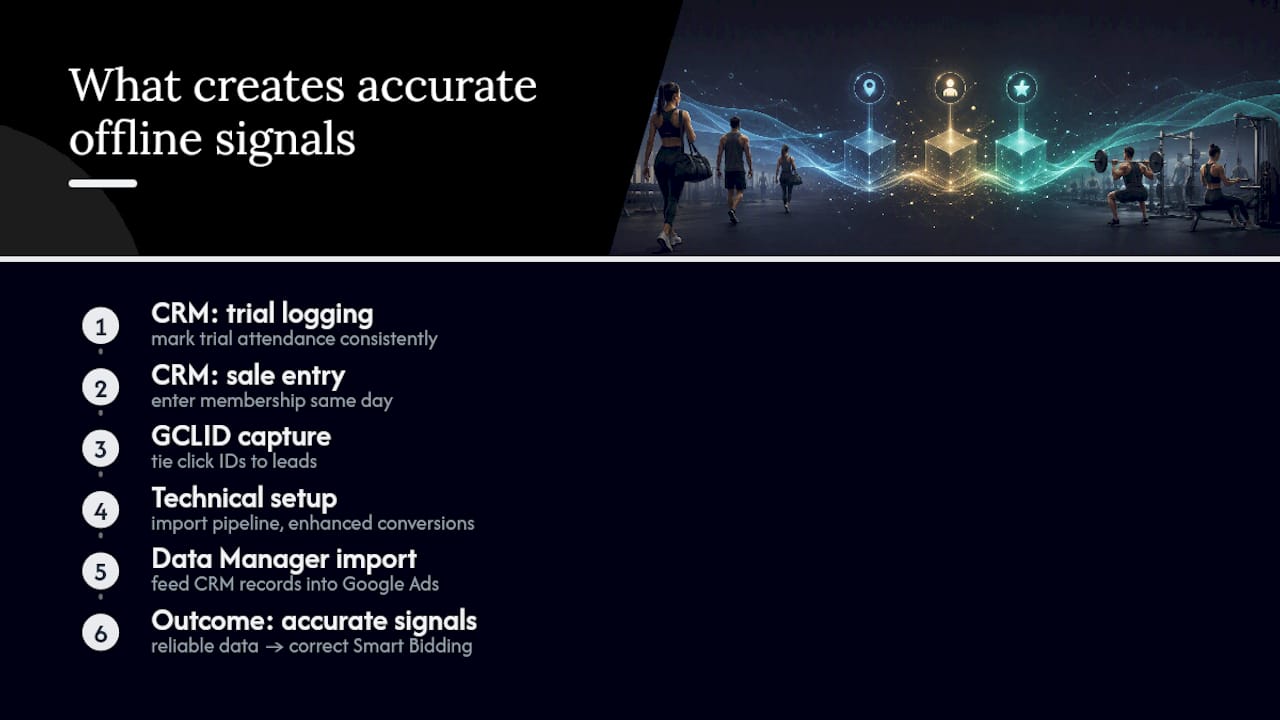
If you're weighing where to spend your limited setup time, spend it on the CRM workflow before the Google Ads configuration. A perfectly configured import feeding inconsistent, delayed data will mislead Smart Bidding faster than no import at all, because the algorithm trusts whatever signal it receives. Garbage in, confidently optimized garbage out.
Prioritize, in order: consistent trial attendance logging, same-day membership sale entry, then the technical import itself. Gyms that reverse that order end up with tracking that looks sophisticated on paper and produces worse bidding decisions than the simple lead-count model they replaced.
— Collin
Get Your Tracking and Ads Built by People Who Only Work With Gyms
We are the alternative to piecing this together yourself with a generalist agency unfamiliar with gym-specific CRM GCLID mapping. We build the tracking, the enhanced conversions setup, and the Google Ads campaigns as one connected system, rather than through separate vendors who don't communicate with each other.
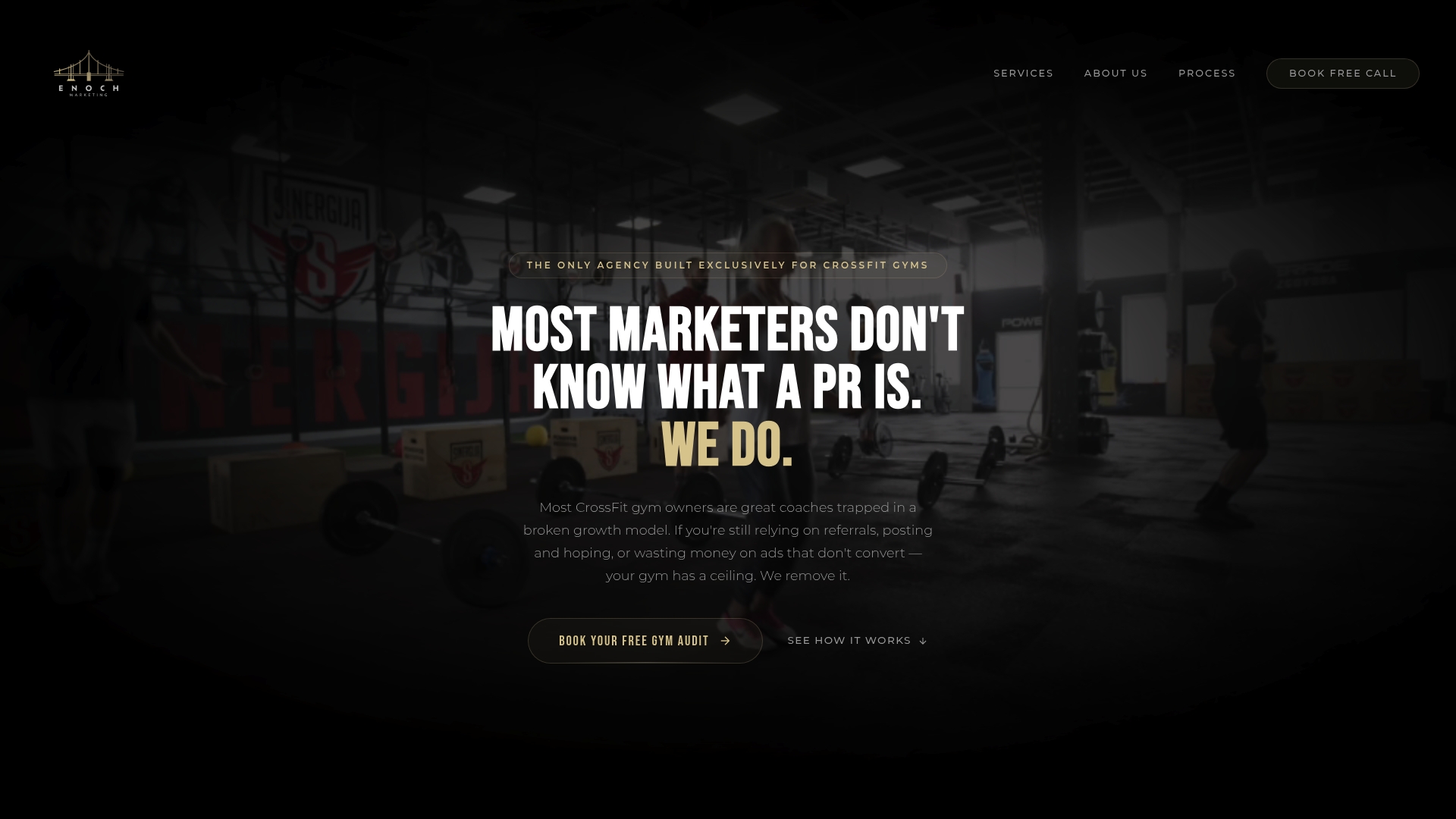
Our process starts with an audit of your current tracking and lead flow, then moves into building the conversion actions, CRM mapping, and server-side tagging your setup actually needs. From there, we run and optimize your Google Ads campaigns against real membership outcomes instead of raw lead counts, and we scale spend once the data proves out. If your CRM and follow-up process need work too, our lead generation and booking systems close that gap alongside the ad management.
Check our service packages and pricing and book a strategy call to see what a properly tracked gym ad account looks like.
Where to Go for the Technical Details
Google's own documentation is the source of truth for anything that changes on the platform side, and it updates faster than any third-party guide can track.
Start with Google's offline conversion import overview for the core concepts, then the import guidelines page for the specific rules around upload timing and validation columns. For hands-on setup steps written in plain language, Shopify's offline conversion tracking guide walks through the process end to end. Developers building a Data Manager or API integration should work directly from Google's enhanced conversions for leads developer documentation, which covers hashing requirements and endpoint specifics the help center doesn't.
Sources
- About offline conversion imports - Google Ads Help
- How Offline Conversion Tracking Works with Google Ads
- Developers — enhanced conversions for leads setup