
Yes. Installing the Meta Pixel is the fastest way for a gym to measure which Facebook ads actually turn into trial bookings and memberships. Grab your Pixel ID from Meta Events Manager, add it to your website or gym portal today, and set up tracking for Lead and Booking events before you spend another dollar on ads. The rest comes down to installation, event tracking, and testing, which is what the following sections walk through.
TL;DR:
- Installing the Pixel before launching ads allows gyms to optimize campaigns and avoid wasting ad spend by tracking actual conversions rather than relying on guesses.
- For gyms with multiple locations, using a shared Pixel with location parameters can strengthen lookalike audiences and improve targeting accuracy.
- Prioritizing specific events such as Lead, CompleteRegistration, or Purchase, and adding value parameters, enhances Meta's algorithm in optimizing for high-value memberships over simple leads.
- Testing Pixel implementation with tools like Pixel Helper and Test Events ensures data accuracy, reducing the risk of incorrect or duplicate event firing.
- Combining pixel data with retargeting, lookalike audiences, and volume-based optimization significantly lowers cost per trial and increases membership conversions.
Table of Contents
- How Do You Install the Facebook Pixel for Gyms?
- How Does the Pixel Connect to Gym Booking Funnels and Member Portals?
- Which Events Should Gyms Track With the Pixel?
- How Do You Use Pixel Data to Improve Gym Ad Campaigns?
- How Do You Test and Troubleshoot a Gym's Facebook Pixel?
- What About Privacy and the Conversions API?
- An Agency's Take on Turning Pixel Data Into Members
- How Enochmarketing Gets Your Gym's Pixel Working Faster
- Where to Learn More About Facebook Pixel Tracking for Gyms
- Sources
How Do You Install the Facebook Pixel for Gyms?
Every gym's tech setup looks different, but the process to get the pixel running follows the same basic path no matter what platform runs your website.
Start in Meta Events Manager. Log into your Meta Business Suite, navigate to Events Manager, and either select an existing pixel or create a new one. Meta assigns a unique 16-digit Pixel ID the moment you create it. Copy that number. You'll need it for whichever install method fits your setup.
- Find your Pixel ID in Events Manager under Data Sources. Click your pixel, then "Settings" to view the ID and the base code snippet.
- Direct code install: paste the base code into the
<head>section of every page on your site, ideally through your site's global header template so it fires site-wide without manual repeats. - Google Tag Manager route: create a new tag, select "Custom HTML," paste the pixel code, set the trigger to "All Pages," then publish the container. This is usually cleaner for gyms running WordPress or a custom-built site, since you avoid touching template code every time something changes.
- Gym portal or plugin install: check your platform's settings for a dedicated Pixel ID field or script injection area. Many gym-management tools have one built in.
- Verify the install using Meta Pixel Helper, a free browser extension, before you spend a dollar on ads.
Pro Tip: Install the pixel on your site or portal before you touch a single ad campaign. Running Facebook ads without tracking already in place means Meta's algorithm is optimizing blind, and you won't know which ad actually filled your trial calendar.
Running ads without conversion tracking wired up leaves the algorithm unable to optimize toward memberships at all, which is a big reason gyms waste ad spend in the first few weeks of a campaign, according to Optimized Growth's gym advertising guide.
How Does the Pixel Connect to Gym Booking Funnels and Member Portals?
Where you install the pixel depends on where your traffic actually lands. A gym running a simple WordPress site with an embedded booking widget installs differently than one using a dedicated gym-management platform that hosts its own trial signup pages.
- If your booking funnel lives on your own domain, install the base pixel in the header and fire event codes on specific pages (thank-you pages, booking confirmations).
- If your gym-management system hosts its own portal pages, check vendor documentation first. Some platforms, like GymMaster, include a dedicated Pixel ID field you paste directly into settings, no code editing required.
- If your platform lacks a native field, look for a webhook or Zapier-style integration that can pass booking confirmations to a thank-you page carrying the pixel code.
- For multi-location gyms, decide upfront whether each location gets its own pixel or shares one account-level pixel with location parameters attached to events. Shared pixels make lookalike audiences stronger since they pool more conversion data.
- If an agency manages your ad account, insist on keeping the pixel inside your own Meta Business Manager. Pixel ownership should stay with the gym so your audience and conversion history survive if that agency relationship ends.
That last point matters more than most gym owners realize. Owning your ad account and pixel outright means you keep control of conversion tracking no matter who's running your campaigns, a point GymRoute's targeting guide makes directly.
Which Events Should Gyms Track With the Pixel?
Not every event carries equal weight. Prioritize the ones that map directly to how someone becomes a member.
- PageView fires automatically on every page, giving you baseline traffic data.
- ViewContent fires on class-schedule or pricing pages, showing genuine interest.
- Lead fires when someone submits a contact form or opts into a free trial offer.
- InitiateCheckout fires when someone starts a membership signup flow.
- CompleteRegistration or Purchase fires when someone finishes signing up or pays.
Beyond the standard set, gyms benefit from custom events tailored to how memberships actually get sold: BookedTrial for a scheduled intro session, TrialShowUp for someone who actually walks in, and MembershipStart for a converted paying member. Naming them clearly like this makes reporting far easier six months down the line.
Which one you optimize toward depends on volume. If you're only generating a handful of leads a week, optimize for Lead so Meta has enough signal to learn from. Once you're converting dozens of members a month, shift optimization to Purchase or CompleteRegistration and add a value parameter so Meta prioritizes higher-value signups, not just any signup.
Pro Tip: Add a value and content_id parameter to your Purchase event tied to membership tier. A $200/month unlimited plan and a $59/month punch card shouldn't count the same to Meta's algorithm, and without that parameter, they will.
Tracking events like ViewContent, Lead, and CompleteRegistration is what lets Meta's delivery system actually optimize toward people who become members, rather than just people who click, per Optimized Growth.
How Do You Use Pixel Data to Improve Gym Ad Campaigns?
Once the pixel is collecting real data, it becomes the foundation for three tactics that consistently lower cost per trial for gyms.
- Build custom audiences from pixel data. Create one from all site visitors in the last 30 days, another from people who viewed your trial or pricing page but didn't convert, and a third from form abandoners. Retarget each with a different message. Someone who saw pricing and left needs a different ad than someone who never got that far.
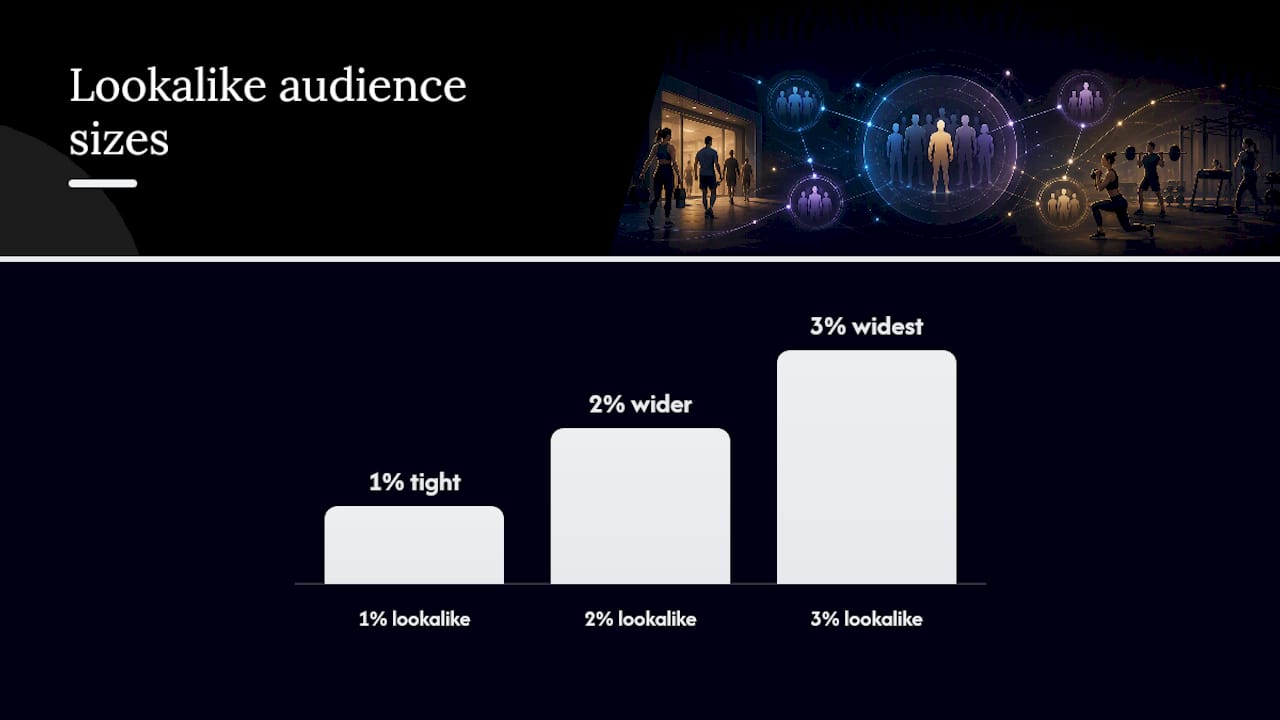
- Layer in lookalike audiences. Once your pixel has enough paying-member data, build a lookalike from that list rather than from general leads. A 1% lookalike stays tightly matched to your best members; widen to 2% or 3% once you need more reach and can tolerate a slightly looser match.
- Shift optimization as volume grows. Start campaigns optimizing for Lead while your data is thin, then move to Purchase or value-based optimization once you have enough conversions for Meta's algorithm to learn from.
GymRoute recommends running three audience types together for gym campaigns: a cold local radius audience for new reach, a warm retargeting audience built from pixel visitors and video viewers, and a lookalike sourced from your paying-member list. A gym running a "first class free" offer, for example, might send cold traffic to a trial landing page, retarget viewers who didn't book with a testimonial video, and run a lookalike campaign promoting a slightly different angle, like a class-schedule highlight, to avoid ad fatigue.
Sending that cold traffic to a purpose-built booking funnel rather than your homepage tends to produce noticeably higher show-up rates than a generic contact form.
How Do You Test and Troubleshoot a Gym's Facebook Pixel?
Installing the pixel is only half the job. Confirming it's firing correctly is what keeps your data trustworthy.
- Open Meta Pixel Helper in Chrome while browsing your own site. A green icon means events are firing; a gray or red one flags a problem immediately.
- Use Test Events inside Events Manager to watch events register in real time as you click through your own booking flow.
- Check for the most common failures: wrong Pixel ID pasted from an old campaign, the same event firing twice on one page (often a plugin conflict), browser cache showing stale results, or code that's live on staging but never pushed to production.
- If you're running server-side tracking through the Conversions API, check the receipts in Events Manager to confirm events are landing there too, not just from the browser pixel.
- If none of that resolves it, that's the point to bring in a developer or an agency rather than losing another week of ad spend on unverified data.
What About Privacy and the Conversions API?
Disclose your tracking practices in your privacy policy and follow the consent requirements that apply to your site's visitors. That's non-negotiable groundwork, not optional fine print.
Beyond consent, browser-based pixel tracking alone is losing more data every year as browsers restrict cookies. The Conversions API sends event data server-to-server, which recovers a meaningful share of that lost signal.
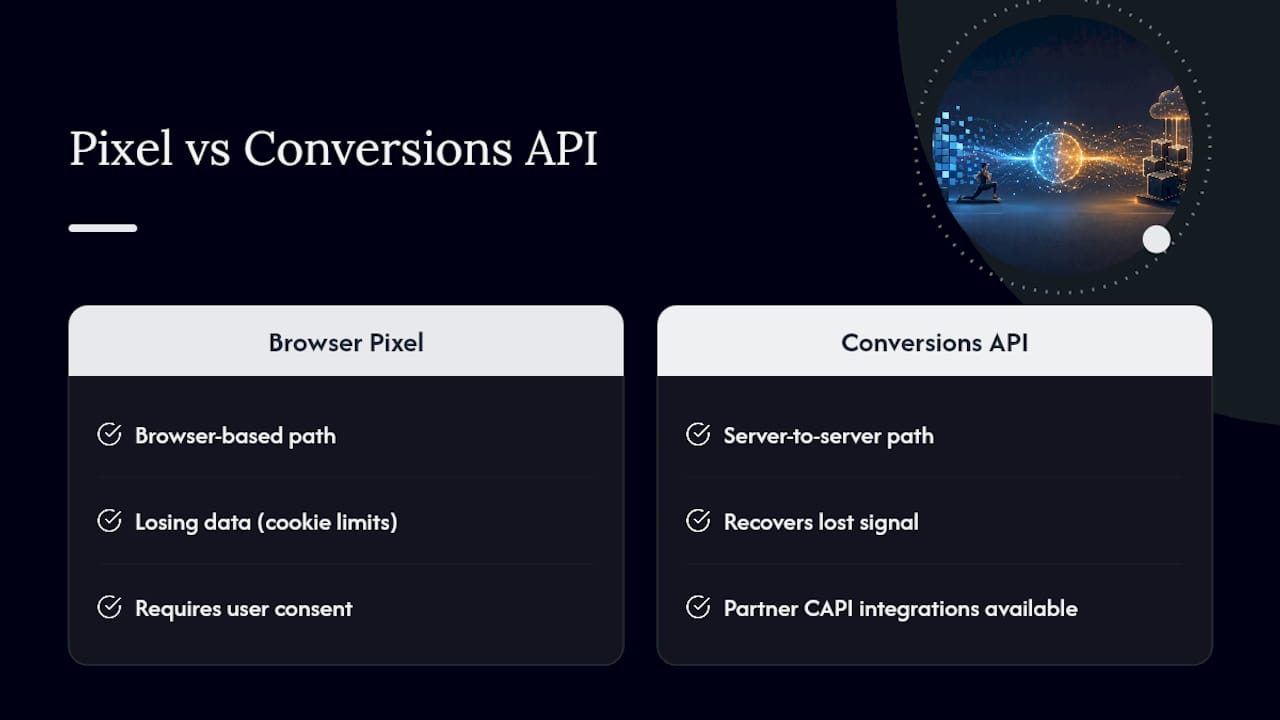
Pro Tip: You don't need to build server-side tracking from scratch. Many gym-management platforms and ad agencies now offer partner CAPI integrations that connect in a few clicks, not a custom dev project.
An Agency's Take on Turning Pixel Data Into Members
Our workflow is deliberately unglamorous: install the pixel, map events to the booking funnel, run Test Events until everything fires clean, then launch a small-budget trial campaign for two to four weeks before touching scale. What we watch closest isn't cost per lead. It's trial-to-member conversion, because a cheap lead that never shows up is worse than an expensive one that joins. Gyms that skip straight to "spend more" without that first month of clean data usually end up rebuilding their campaigns from scratch three months later.
— Collin
How Enochmarketing Gets Your Gym's Pixel Working Faster
Enochmarketing is the alternative to guessing your way through pixel setup: no wrestling with Tag Manager triggers at 11 p.m., no wondering why Events Manager shows zero conversions three weeks into a campaign.
The steps above work, and plenty of gym owners handle them solo. But Pixel and Conversions API setup, funnel builds that actually match your booking flow, and paid social campaigns built around events that map to real memberships, not just clicks, are handled daily for CrossFit gyms and fitness studios. We build the landing pages your ads should point to, set up retargeting sequences around your pixel audiences, and manage the campaign optimization so your ad spend chases members, not vanity metrics. If your gym is ready to stop patching this together in spare hours, book a free strategy session and let's look at what your current setup is actually telling you.
Where to Learn More About Facebook Pixel Tracking for Gyms
For hands-on reference beyond this guide, Meta's own Events Manager documentation and the Pixel Helper troubleshooting tool remain the most reliable starting points for verifying an install. On the gym-specific side, Zen Planner's guide to tracking lead sources and JoinBrands' membership growth playbook both cover attribution and channel testing in more depth than a single pixel setup guide can.
Sources
- Facebook Ads for Gyms: Targeting, Creative & Budget (2026) | GymRoute
- Track and analyze lead sources for your gym | Zen Planner
- Promoting a Gym: 2026 Guide to Membership Growth - JoinBrands