Run a 15 to 30 second in-stream campaign aimed at search-intent audiences, pair it with a time-limited trial offer, and route every click to a dedicated landing page with a 5-minute follow-up rule on the backend. That is the fastest path to booked trials, and it works because YouTube ads for gyms succeed or fail on offer clarity and speed to contact, not video polish.
Do these three things in the next 24 to 48 hours:
- Confirm your Google Ads account is linked to a YouTube channel with at least one uploaded video (even a phone-shot gym tour works for launch).
- Pull one piece of raw footage, a class in session, a coach coaching, and cut a 20-second version with your offer stated in the first 5 seconds.
- Build or update a landing page with a single trial offer, your address, and a form that triggers an instant text or call.
Pro Tip: Skip the "brand awareness" instinct for launch week. Fitness paid search already runs near a $60 cost per lead once you factor in average CPC and clicks needed per lead, so your first campaign should chase trial signups, not views.
Expect your ads to go live within a day of approval, and expect your first qualified leads within 3 to 10 days if targeting and offer are dialed in. Anything longer usually points to a targeting or landing page problem, not an ad platform problem.
Key Takeaways
Gym YouTube campaigns convert best when short, offer-driven creative meets tight local targeting and a follow-up process measured in minutes, not hours.
| Point | Details |
|---|---|
| Lead with one offer | A single trial offer stated in the first 5 seconds outperforms broad brand messaging every time. |
| Keep creative short | Aim for 15 to 30 seconds, with 20 seconds as a reliable standard length for gym ads. |
| Layer audiences carefully | Combine an 8 to 12 mile radius with custom intent keywords rather than relying on broad demographics alone. |
| Test in two-week windows | Give creative and audience tests a full two weeks before deciding what to cut or scale. |
| Speed wins leads | A 5-minute follow-up rule after form submission protects show-up rates more than extra ad spend does. |
| Get expert help if needed | Enochmarketing runs the full audit-to-scale process for gyms that want a managed YouTube launch. |
Table of Contents
- Step-By-Step Checklist To Set Up YouTube Ads For Gyms
- Which YouTube Ad Formats Work Best For Gym Campaigns?
- Which Audiences Actually Convert Views Into Trial Signups?
- What Should You Budget, And What KPIs Are Realistic?
- What Landing Page And Follow-Up Turn Clicks Into Booked Trials
- How Long Should You Test Before Scaling A Winning Ad?
- Which Conversions And Reports Actually Matter?
- How Do You Avoid Google Ads Policy Disapprovals For Fitness Ads?
- How Does A Specialist Agency Run YouTube Campaigns For Gyms?
- Why Gym-Specific Creative Beats Generic Brand Video
- How Enochmarketing Handles YouTube Ads For Gyms
- Frequently Asked Questions About YouTube Ads For Gyms
- Sources
Step-By-Step Checklist To Set Up YouTube Ads For Gyms
Before you touch campaign settings, three things need to exist: an active Google Ads account with billing attached, a YouTube channel (even a bare-bones one) where your video lives, and at least one finished ad creative uploaded and public or unlisted. Skipping any of these three stalls the whole launch, so confirm them first.
Once that's in place, build the campaign in this order:
- Choose your campaign goal. Pick "Leads" as the objective, not "Awareness" or "Brand consideration." This shapes which bidding strategies Google surfaces later.
- Select the campaign subtype. Use "Video" campaign type with the "Drive conversions" subtype, which unlocks TrueView in-stream and gives you access to conversion-based bidding.
- Set placements. Start with YouTube search results, YouTube videos, and Google video partners. Turn off Google video partners if your budget is under $30/day, since quality varies widely there.
- Build ad groups by offer, not by demographic. One ad group for your free trial, a separate one for a class-pack promo, keeps reporting clean and avoids diluting your message.
- Upload creative and write your headline, description, and call-to-action button (use "Sign Up" or "Get Offer," not the generic default).
- Layer audiences, starting with a location radius, then custom intent keywords, then remarketing lists once you have traffic.
- Add exclusions, cutting out age 65+ unless that's genuinely your member base, and excluding YouTube Kids and made-for-kids content.
Here's what to copy for your first campaign, adjusted for a mid-size independent gym:
| Setting | Recommended value |
|---|---|
| Campaign type | Video, "Drive conversions" subtype |
| Bidding strategy | Maximize conversions (switch to Target CPA after 30+ conversions) |
| Start/end dates | No end date for evergreen; two weeks for a resolution or seasonal push |
| Frequency cap | 3 impressions per user per week |
| Location radius | 8 to 12 miles from your facility |
| Daily budget guardrail | $20 to $30/day for testing phase |
Before you launch, run through a short QA pass: preview the ad on both mobile and desktop, click through your own landing page from a phone to confirm the form actually submits, and check that your conversion action is set to "Primary" so it feeds your bidding algorithm. A campaign that looks perfect in the builder but points to a broken form is the single most common reason gym owners think "YouTube ads don't work."
Pro Tip: Smoke-test with a $5/day budget for 48 hours before committing your full spend. This surfaces broken tracking or policy disapprovals cheaply, before you have real money riding on a campaign that isn't actually live the way you think it is.
Which YouTube Ad Formats Work Best For Gym Campaigns?
Five formats matter for gyms, and each does a different job. Skippable in-stream ads are your workhorse: viewers can skip after 5 seconds, so you only pay for engaged views, and cross-industry view rates on skippable in-stream ads sit around 31.8 percent, meaning nearly a third of people who see your ad choose to keep watching. That's your primary format for trial-offer campaigns.

Non-skippable in-stream ads (15 seconds, can't be skipped) work well for a punchy, single-message push, but they cost more per impression and can irritate viewers if overused. Bumper ads, capped at 6 seconds, are built for frequency and urgency, think "last day for January pricing." Discovery ads appear in YouTube search results and next to related videos, which makes them useful for capturing people already searching for a gym near them. YouTube Shorts ads are newer territory but worth testing if your audience skews under 35, since they mimic the vertical, fast-cut format people already scroll through daily.
For length, the sweet spot for gym ads is 15 to 30 seconds, with 20 seconds as a reasonable standard. Anything longer loses viewers before your offer even appears. Your first 5 seconds carry the most weight: a strong visual hook in that window meaningfully raises view-through rates, so open on movement, energy, or a real member, never a logo screen or slow fade-in.
Three scripts you can shoot this week:
1. The 20-second trial-offer in-stream ad Open on a class mid-workout (0 to 3 seconds). Voiceover: "Your first class is on us." Cut to three quick shots: a coach correcting form, members high-fiving, a clock counting down a workout (4 to 12 seconds). Voiceover: "[Gym Name] has [X] classes a week, all skill levels welcome." End card with offer text and a clear CTA button (13 to 20 seconds).
2. The 6-second urgency bumper Single shot of a packed class or a busy front desk. Text overlay: "Free week. This month only." Logo and CTA in the last 2 seconds.
3. The 30-second testimonial for remarketing A real member, on camera, unscripted, answering "What changed since you joined?" Cut in b-roll of them training. Close on them looking at the camera saying the gym's name and inviting the viewer to try it.
Pro Tip: Your thumbnail and opening frame get judged in a split second. Choose a frame with a person's face and visible motion, never a still shot of an empty gym floor, and shoot vertical or square versions of everything so the same footage works across Shorts and standard placements.
Which Audiences Actually Convert Views Into Trial Signups?
Layering, not broad targeting, is what makes gym YouTube ads efficient. A strong audience recipe stacks three things: a location radius of 8 to 12 miles, an age band matching your actual member base (usually 25 to 54 for general fitness, wider for CrossFit), and a Google custom intent audience built from search terms like "gym membership near me" or "[your city] gym."
Recommended layering sequence:
- Start broad with location and demographic filters only, to build volume and gather remarketing data.
- Add a custom intent audience once you have 500+ impressions, targeting people who recently searched gym-related and fitness-class terms.
- Layer in a "recently moved" or "life event" affinity signal if your city has meaningful population turnover, new residents are disproportionately likely to shop for a gym.
- Build remarketing lists from video viewers and landing page visitors, and run these as a separate ad group with a different creative.
On affinity and in-market categories, be selective. Google's broad "fitness enthusiasts" affinity audience sounds right but tends to include people who already have a gym and just watch workout content, low intent, high impression waste. In-market audiences for "gym memberships" perform better because they signal active shopping behavior.
Retargeting deserves its own windows:
- 0 to 7 days: Show the trial-offer creative again, viewers who just watched are your warmest audience and respond to a direct "claim your free week" message.
- 7 to 30 days: Shift to the testimonial ad, since this group needs social proof more than urgency at this point.
- 30 to 90 days: Use a fresh angle, a new class type, a facility upgrade, or a seasonal offer, since the same creative repeated for three months burns out fast.
Cap frequency at 3 to 4 impressions per week per user, and build an exclusion list for anyone who's seen your ad 8+ times without converting. Beyond that point, you're paying to annoy the same people, not to persuade new ones.
What Should You Budget, And What KPIs Are Realistic?
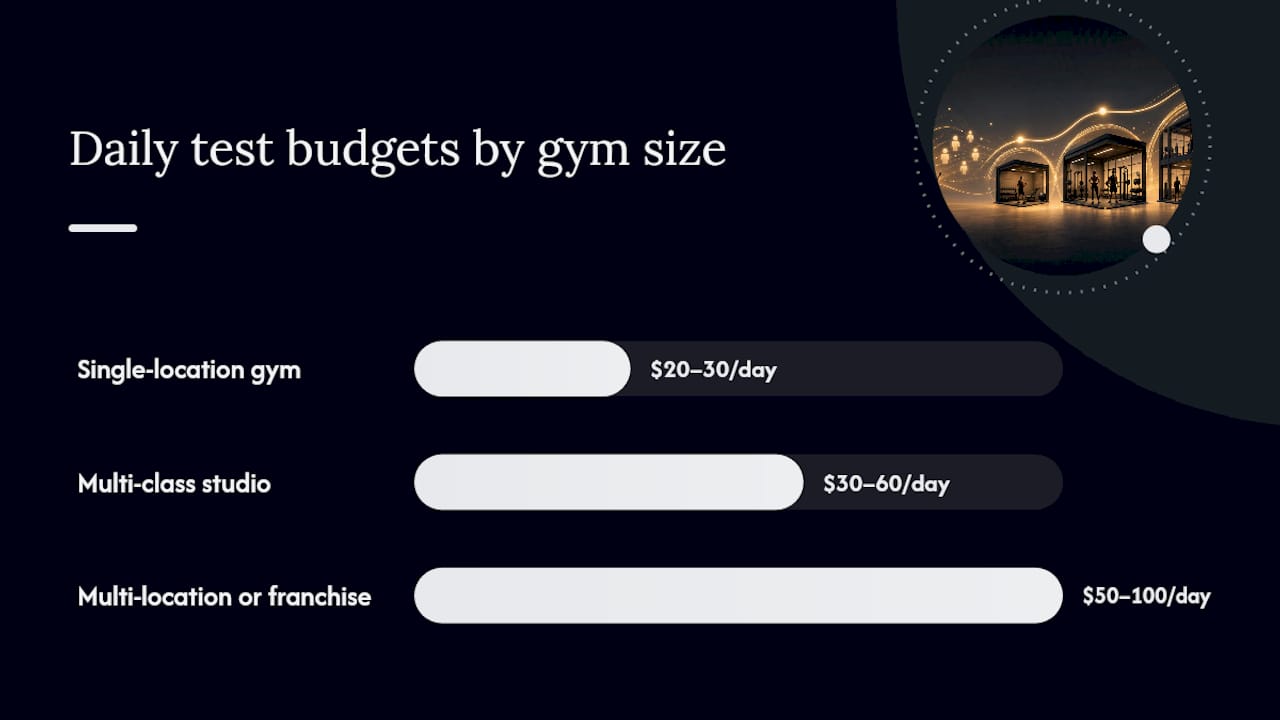
Budget scales with gym size, but the test phase should stay lean regardless. A single-location gym should run $20 to $30/day for the first two weeks. A multi-location operation or a larger fitness brand can justify $50 to $100/day split across two or three creative variants. Run each test phase for a minimum of two weeks, shorter windows rarely gather enough data to separate signal from noise.
| Gym size | Daily test budget | Test duration | Bidding strategy |
|---|---|---|---|
| Single location, smaller member base | $20 to $30/day | two weeks | Maximize conversions |
| Multi-class studio, mid-sized member base | $30 to $60/day | two to three weeks | Maximize conversions, then Target CPA |
| Multi-location or franchise | $50 to $100/day | three weeks | Target CPA or vCPM for top-funnel |
Start most campaigns on Maximize Conversions bidding since it needs less historical data to work well. Once you've logged 30 or more conversions, switch to Target CPA so Google's algorithm can optimize toward your actual cost ceiling. Reserve vCPM (viewable cost per thousand impressions) for pure awareness plays, like a new location opening, where signups aren't the immediate goal.
On expected numbers: cross-network cost-per-view averaged a low amount in early 2026, and skippable in-stream view rates hover near 31.8 percent industry-wide. Translating that into cost-per-lead is trickier since it depends heavily on your landing page and offer, but fitness paid search overall runs near an average cost per lead benchmark around $60 once you count clicks needed per conversion. YouTube often comes in lower than search for cost-per-lead because video builds trust before the click even happens, but treat $60 as your ceiling benchmark until your own data tells you otherwise.
Pro Tip: Before setting a target CPA, calculate your safe number: take your average member lifetime value, subtract your typical churn-adjusted cost to serve them, and set your acceptable CPA at no more than 20 to 30 percent of that remaining margin. A gym with a $150 average member LTV can usually afford a higher CPA than the raw cost-per-lead number suggests, because retention, not the first click, is where the real return shows up.
What Landing Page And Follow-Up Turn Clicks Into Booked Trials
Your ad can be flawless and still fail if the landing page asks for too much or the offer is muddled. Keep it to one offer per page: don't list your free trial, your class schedule, and your merchandise store on the same screen. A gym landing page that converts well typically includes your single offer stated above the fold, your address and a map, a short form (name, phone, email, nothing more), and one trust signal like a Google rating or member count.
Offer formats that actually move people to click "sign up": a free trial week performs consistently, a discounted first month works well for higher-price studios, and a class-pack trial (say, five classes for $25) fits gyms whose regular pricing is a harder first ask. Whatever you choose, state it plainly: "Free Week. No Contract." beats "Discover Your Fitness Journey" every time.
The workflow that connects the ad to a booked trial looks like this:
- Viewer clicks the ad and lands on a single-offer page.
- Form submission fires a conversion event and pushes the lead into your CRM instantly.
- An automated text goes out within 60 seconds confirming receipt and offering a scheduling link.
- A staff member calls within 5 minutes during business hours.
- If no answer, an automated follow-up sequence continues over the next 48 hours.
That last step matters more than most gym owners assume: local paid campaigns that pair intent targeting with a fast follow-up process see far better show-up rates than campaigns that let leads sit for hours. A lead who filled out a form at 7 p.m. and doesn't hear back until the next morning has often already texted a competing gym or lost interest entirely.
Pro Tip: Set a hard internal rule: 5 minutes from form submission to human contact during open hours. Studies on lead response consistently show conversion rates fall off a cliff after the first few minutes, and gym trials are no exception. If you can't staff that in real time, a basic CRM automation with instant text plus a callback within the hour is the next best option.
How Long Should You Test Before Scaling A Winning Ad?
Give every test two full weeks minimum before making a keep-or-kill decision. Shorter windows get fooled by weekday-versus-weekend swings and small sample sizes, especially for a single-location gym running a modest daily budget.
Prioritize what you test in this order:
- Creative hook first. The first 5 seconds of your video decides whether anyone sees your offer at all, so test two different opening shots before touching anything else.
- Landing page second. If your view rate looks healthy but form submissions are weak, the problem sits on your page, not your video.
- Audience third. Once creative and landing page are solid, test whether a tighter radius or a different custom intent list improves lead quality.
- Bidding strategy last. Don't touch bid strategy until you have enough conversion volume for Google's algorithm to actually learn from.
Watch view rate, click-through rate, and landing page bounce rate as your early warning signals. A view rate under 20 percent usually points to a weak hook or mismatched audience. A high view rate paired with a high landing page bounce rate almost always means the offer on the page doesn't match what the ad promised. Don't overreact to a single bad day, look for a pattern across at least 3 to 4 days before calling a test a failure.
Pro Tip: Run two to three creative variants at once, never more. Splitting a modest daily budget across five or six versions of an ad starves each one of enough views to produce a reliable signal, and you'll end up guessing rather than knowing which creative actually won.
Which Conversions And Reports Actually Matter?
Set up four conversion actions before you spend a dollar: trial bookings submitted through your landing page form, phone calls that last longer than 60 seconds (using Google's call tracking), and, if relevant, direct class-pack purchases. Map each of these into both Google Ads and GA4 so you're not relying on one platform's incomplete view of what happened.
Your reporting dashboard should track:
- View rate and CPV, to gauge whether your creative and targeting are efficient at the top of the funnel.
- Click-through rate and landing page conversion rate, to spot whether the drop-off happens before or after the click.
- Cost per lead and trial-to-paid conversion rate, since a cheap lead that never converts to a member is worse than an expensive one that does.
- CPA against member LTV, the number that actually tells you whether the campaign is profitable.
Attribution gets messy fast if you're running YouTube alongside search and social. Use a single attribution model (Google Ads' data-driven model is a reasonable default) and check your CRM for duplicate lead entries weekly, since the same person filling out your form twice from two different ad clicks will otherwise inflate your lead count and understate your real cost per lead. Review this dashboard weekly during the test phase and monthly once campaigns stabilize, and put one specific person, not "the team", in charge of watching it. Metrics nobody owns tend to get checked only when something's already gone wrong.
How Do You Avoid Google Ads Policy Disapprovals For Fitness Ads?
Fitness ads get flagged more often than most categories because Google's health and wellness policies are strict about implied claims. The most common triggers: before-and-after body images, language implying guaranteed weight loss or specific results ("lose 10 pounds in 2 weeks"), and any copy that could read as targeting body insecurity directly.
Keep copy factual and offer-focused: "Free trial week, all fitness levels" clears review far more reliably than "Transform your body in 30 days." Avoid close-up body imagery that isolates specific body parts, and steer clear of testimonials that state specific numeric results unless you can substantiate them.
Before launching, run a quick approval check: submit your ad, wait for the standard review window (usually a few hours, sometimes up to a day), and check the ad's status in Google Ads before assuming it's live. If disapproved, the policy manager tells you exactly which policy triggered it, fix that specific line rather than rewriting the whole ad, and resubmit.
Pro Tip: Submit your ad creative 48 hours before your planned launch date, not the same day. This gives you a buffer to fix a disapproval and resubmit without pushing your entire campaign timeline back.
How Does A Specialist Agency Run YouTube Campaigns For Gyms?
A structured process is what separates a campaign that limps along from one that compounds. Enochmarketing runs gym-specific YouTube launches through five stages: audit, creative brief, test launch, optimization sprint, and scale.
- Audit existing creative assets, landing pages, and CRM setup to identify what's reusable and what's missing before spending a dollar on media.
- Creative brief built around one specific offer and audience, not a generic "grow membership" goal.
- Test launch at a conservative daily budget over a defined two-week window, matching the testing cadence covered earlier in this guide.
- Optimization sprint where underperforming creative gets cut and winning variants get more budget.
- Scale once cost-per-lead and trial-to-paid rates are proven stable, not just promising.
In managed campaigns following this structure, view rates have landed in line with the 31.8 percent industry benchmark for skippable in-stream ads, with CPV and cost-per-lead figures varying by market and offer strength, presented here as example ranges rather than guarantees for any specific gym.
A creative brief worth copying includes five fields: audience (who exactly, defined by intent and location), hook (the first 5 seconds, written out word for word), offer (one sentence, no ambiguity), assets needed (raw footage, testimonials, b-roll), and KPIs (the specific numbers that define success before the campaign launches).
- Retention automation gets built into the funnel from day one, not bolted on after members churn.
- Lower churn directly raises the acceptable CPA a gym can pay, which is why Enochmarketing treats retention and acquisition as one system rather than two separate projects.
- CRM handoff speed gets audited alongside ad performance, since a fast lead response often matters more than a marginally better ad.
Why Gym-Specific Creative Beats Generic Brand Video
Most gyms lose money on YouTube not because the platform doesn't work, but because they run the same broad, brand-awareness style video every other local business runs. A shot of the building, some upbeat music, a logo at the end. That approach might work for a car dealership with a six-month sales cycle. It doesn't work for a gym, where the person watching your ad has probably already decided this month is the month they're joining something, and they're deciding which gym gets that decision.
What actually moves that person is specificity: a real class, a real coach, a real offer with a deadline, and a landing page that doesn't make them hunt for how to sign up. The data backs this up plainly, ads with a strong opening hook and a clear offer consistently outperform polished but vague brand content, and the fastest-growing gyms I've studied treat their YouTube ads less like commercials and more like a digital front desk, always answering the same question a walk-in would ask: what do I get, and what does it cost me to try it?
If you're weighing whether to build this yourself or bring in help, the honest answer is that either can work, but the campaigns that stall usually have a gap between the ad and the follow-up, not a gap in ad quality. If you want a second set of eyes on where that gap might be in your own setup, a quick audit conversation is worth more than another week of guessing.
How Enochmarketing Handles YouTube Ads For Gyms
Enochmarketing runs YouTube campaigns exclusively for CrossFit gyms and fitness studios, which means the creative briefs, landing pages, and CRM handoffs described throughout this guide aren't theoretical, they're the actual build process for every client launch.
The service package most relevant here covers creative production (shot specifically for your gym, not stock footage), landing page builds tied to a single trial offer, conversion tracking set up correctly from day one, and CRM integration so leads get the 5-minute follow-up this guide keeps coming back to. Engagement models flex based on what a gym actually needs: a one-off campaign launch for gyms who want to test the waters, or an ongoing retainer for gyms ready to treat YouTube as a permanent acquisition channel alongside broader paid ad strategy. Pricing details for each option are outlined on the Enochmarketing pricing page.
If you'd rather have someone else build and run this launch while you focus on coaching and retention, book a strategy call and get a specific plan back, not a generic pitch.
Frequently Asked Questions About YouTube Ads For Gyms
How much should a small gym budget for YouTube ads to start? Start with $20 to $30 per day for a two-week test phase. That's enough volume to generate meaningful data without overcommitting before you know your cost-per-lead.
What is a realistic cost per lead for gym YouTube campaigns? Expect somewhere near or below the roughly $60 cost-per-lead benchmark seen across fitness paid search, since YouTube often runs cheaper once creative and targeting are dialed in.
Do I need professional video production for gym ads to work? No. Phone-shot footage of real classes and real members frequently outperforms polished but generic video, as long as the hook is strong and the offer is clear within the first 5 seconds.
How long before a YouTube ad campaign generates real leads for a gym? Expect approval within a day and initial leads within 3 to 10 days if targeting and landing page are set up correctly. Give any test campaign two full weeks before judging results.
Should I run YouTube ads instead of Meta ads for my gym? They serve different jobs. YouTube tends to build trust through video before the click, while Meta often drives faster, lower-cost initial clicks. Many gyms run both, with YouTube's creative repurposed across both platforms.
Sources
- Gym Marketing in 2026: The Full Playbook
- How to Create Effective Gym Ads with Ideas 2026
- YouTube Ads for Australian Gyms: Convert New Year Resolution Seekers Into Long-Term Members