
Aim for a Largest Contentful Paint (LCP) of 2.5 seconds or less, an INP under 200 milliseconds, and a Cumulative Layout Shift (CLS) below 0.1. If your gym site misses those numbers, the two fastest fixes are compressing and converting images to WebP or AVIF, and deferring any script that isn't your booking widget. Most gyms see measurable SEO and conversion gains within weeks of making both changes.
TL;DR:
- Compressing images to WebP or AVIF and deferring non-essential scripts can increase PageSpeed scores from the 40s into the 70s, significantly improving load times.
- The average gym website's mobile loading time is around 14 seconds, far exceeding Google's 2.5 second target, which harms both rankings and user experience.
- Slow mobile sites contribute to lost leads at critical points like booking forms, where delays cause prospects to abandon pages, increasing overall acquisition costs.
- Testing your site with tools like Google PageSpeed Insights, GTmetrix, and WebPageTest, then focusing on real user monitoring, ensures fixes are effective based on actual visitor data.
- Major speed improvements come from simple fixes owners can implement quickly, with more advanced optimization like hosting upgrades and code refinement being key for sustained performance.
Table of Contents
- Why Gym Website Speed Matters for Search Rankings and Conversions
- How Do You Measure Your Gym's Website Speed?
- Fast, Low-Cost Fixes You Can Make Today
- Developer-Level Fixes and Hosting Decisions
- Handling Booking Widgets, CRMs, and Other Gym-Specific Scripts
- Testing Changes and Monitoring Speed Over Time
- Your 30 and 90-Day Gym Website Speed Action Plan
- How Enoch Marketing Approaches Gym Website Speed Audits
- A Publisher's Take on Speed vs. Visuals
- Get Your Gym Website Speed Fixed Without Hiring a Full-Time Developer
- Essential Tools for Testing Gym Website Speed
- Sources
Why Gym Website Speed Matters for Search Rankings and Conversions
Google folds Core Web Vitals into how it ranks pages for local searches like "gym near me" or "CrossFit box open now." Mobile devices generate most of that traffic, and mobile-first indexing means Google evaluates your phone experience, not your desktop one.
Here's the uncomfortable part: the fitness industry is failing this test badly. Industry analysis puts the average gym website LCP at around 14.0 seconds, against Google's 2.5 second target. That's not a small gap. That's the difference between a page that loads while someone is still deciding which gym to call and one they abandon before the hero image even appears.
The Numbers Behind the Bounce The same analysis found average mobile PageSpeed scores for gym sites hovering around 47 out of 100. On mobile fitness sites specifically, traffic share exceeds 72%, so a slow mobile experience isn't a minor issue. It's the primary experience most prospects have with your gym.
Every second of delay chips away at conversions, and gyms feel this most acutely at the booking form. A prospect fills out three fields on a free trial form, hits submit, and stares at a spinner for four seconds because a chat widget is still loading in the background. Some of them close the tab. That lost lead didn't fail to convert because your offer was weak. It failed because your website design made them wait.
Slow sites also raise acquisition costs indirectly. If you're running Meta or Google ads and sending traffic to a page that takes 6 seconds to load, you're paying for clicks that never convert. Speed isn't cosmetic here. It's a line item hiding inside your marketing budget.
How Do You Measure Your Gym's Website Speed?
You can't fix what you haven't measured, and guessing at your site's speed almost always leads owners to fix the wrong thing. Run these tests in this order before touching anything:
- Google PageSpeed Insights: free, gives you a 0-100 score plus field data pulled from real Chrome users if your traffic volume qualifies.
- GTmetrix: shows a waterfall chart of every file your site loads, which is where you'll spot the bloated plugin or oversized hero video.
- WebPageTest: lets you test from specific locations and connection speeds, useful if members are mostly local.
- A real phone on cellular data: open your own site on 4G or 5G standing in your parking lot. Lab tools lie sometimes; your thumb doesn't.
Record five metrics every time you test: LCP, INP (which replaced First Input Delay as Google's responsiveness metric in 2024), CLS, First Contentful Paint (FCP), and Time to Interactive (TTI). Write down the overall PageSpeed score too, since it's the number you'll show a developer or agency later to prove progress.
One nuance that trips up a lot of owners: lab data from PageSpeed Insights and real-user data (RUM, or Real User Monitoring) sometimes disagree. Lab tests run under controlled conditions; RUM reflects actual visitors on actual devices, including that member on a three-bar signal at the gym parking lot. If PageSpeed says you're fine but RUM data (visible in Google Search Console's Core Web Vitals report) shows problems, trust the real-user numbers. They're the ones affecting your rankings.
Baseline everything before you make a single change. Screenshot the scores, save the date, and you'll have proof of what worked when you revisit this in 90 days.
Fast, Low-Cost Fixes You Can Make Today
You don't need a developer for most of this. Here's what closes the gap fastest, in the order to tackle it:
- Compress and convert every image to WebP or AVIF. Tools like Squoosh or TinyPNG can shrink a 3MB hero photo to under 200KB with barely visible quality loss. As a rule of thumb, any image over roughly 200KB is too heavy for a mobile-first gym site.
- Implement responsive srcset. This serves a smaller image file to phones and a larger one to desktops from the same source, so mobile visitors aren't downloading a desktop-sized file they'll never see at full resolution.
- Turn on lazy loading for offscreen images. Photos below the fold shouldn't load until a visitor scrolls near them. Most modern themes and page builders support this with a single toggle.
- Defer autoplay video embeds. A background hero video is often the single heaviest asset on a gym homepage. Replace autoplay with a poster image and a play button, or host it on YouTube and lazy-load the embed.
- Audit every plugin and widget, then delete what you don't use. Old booking integrations, unused social feed plugins, and abandoned pop-up builders all add script weight even when they're invisible on the page.
- Turn on caching. A caching plugin (WP Rocket, LiteSpeed Cache) or host-managed caching stores a ready-built version of your page so the server doesn't rebuild it from scratch for every visitor. Set a cache time-to-live (TTL) of at least a day for static pages like your schedule or pricing page.
Combined, these changes routinely cut load times by 60 to 80 percent on fitness sites, often pushing a PageSpeed score from the 40s into the 70s without a single line of custom code.
Pro Tip: Test your site on your own phone right after a workout, when your hands are a little impatient and your signal is mediocre. That's the honest experience most of your prospects are having, and it's a better gut check than any dashboard.
Developer-Level Fixes and Hosting Decisions
Once you've squeezed out the easy wins, the next tier of improvement requires either a developer or a hosting change. This is where the real architectural gains live, and where it's worth paying for expertise if you don't have it in-house.
Start with hosting. Shared hosting plans, the cheap $5 to $10 a month kind, are almost always the hidden cause of a slow Time to First Byte, the delay before your server even starts sending data. Managed WordPress hosting or a VPS gives your site dedicated resources instead of sharing a server with hundreds of other sites, some of which might be getting hammered with traffic at the exact moment your prospect tries to load your schedule page.
From there, confirm your host runs a current PHP version and supports HTTP/2 or HTTP/3. Older PHP versions process pages noticeably slower, and HTTP/1.1 forces browsers to request files one at a time instead of in parallel.
A Content Delivery Network (CDN) like Cloudflare or BunnyCDN distributes your static files (images, CSS, JavaScript) across servers physically closer to your visitors, so someone loading your site in Denver isn't pulling data from a server in Virginia. Configure sensible cache rules so static assets are cached aggressively while your booking and pricing pages, which change more often, refresh appropriately. Origin shielding, a CDN feature that reduces direct hits to your main server, helps during traffic spikes like a launch promotion.
On the code side, developers should:
- Minify and bundle CSS and JavaScript files to reduce the number of separate requests a browser makes.
- Implement critical CSS, which inline just the styles needed for the visible portion of the page so it renders before the full stylesheet loads.
- Identify and eliminate render-blocking resources, scripts or stylesheets that stop the page from displaying anything until they finish loading.
- Optimize the database if you're on WordPress, since years of accumulated revision history and spam comments quietly slow down every page load.
- Add object caching (Redis or Memcached) if your site runs dynamic content like membership dashboards.
One judgment call worth making early: if your site runs on a heavy page builder or a bloated theme built for generic small business use, replacing it with a lighter, purpose-built theme sometimes delivers more speed improvement than any single optimization above. Technical SEO guidance for fitness sites consistently flags theme weight as an overlooked bottleneck.
Handling Booking Widgets, CRMs, and Other Gym-Specific Scripts
Booking software and CRMs are the scripts you can't just delete, but they're also frequently the heaviest thing on the page. One recurring finding across fitness-site audits is that third-party booking widgets and page-builder bloat slow a site down more than images do, which surprises a lot of owners who assumed photos were the culprit.
Start by sorting your scripts into two buckets:
- Mission-critical: booking calendars, payment processors, class schedule embeds. These stay, but they get optimized.
- Optional: social media follow badges, review carousel widgets, chat bubbles that duplicate a function your phone number already serves. These get removed or delayed.
For the scripts you keep, use these techniques:
- Async or defer loading, which tells the browser to keep rendering the page instead of pausing to fetch and run that script immediately.
- Conditional loading, so your booking widget only loads on the schedule and pricing pages, not on your blog or about page where it serves no purpose.
- Server-side rendering or lightweight embed alternatives where your booking platform offers them, since a static, styled button that opens a modal is often lighter than a full embedded iframe.
Before rolling any of this out sitewide, test on a staging copy first. A deferred payment script that breaks checkout costs you more than the milliseconds it saved.
Testing Changes and Monitoring Speed Over Time
Speed work isn't a one-time project. Set a cadence: run a lab test (PageSpeed Insights or GTmetrix) weekly for the first month after major changes, then monthly once things stabilize. Pair that with continuous RUM monitoring through Google Search Console, which shows what real visitors on real connections actually experience.
- Set alert thresholds so you notice if LCP creeps back above 2.5 seconds or CLS drifts past 0.1 after a theme update or new plugin install.
- Track conversion metrics (trial signups, schedule page visits) in GA4 alongside your speed metrics, since industry analysis of speed fixes shows the two move together more often than owners expect.
- Run a simple before/after comparison on any change that touches a conversion page, splitting traffic or comparing week-over-week conversion rates rather than assuming a speed fix helped.
Reducing LCP tends to be the single change with the biggest downstream effect on mobile bounce rate, since it's the metric most directly tied to how fast a page feels, not just how fast it technically loads.
Your 30 and 90-Day Gym Website Speed Action Plan
Hand this to whoever owns your website, whether that's you, a manager, or a contractor.
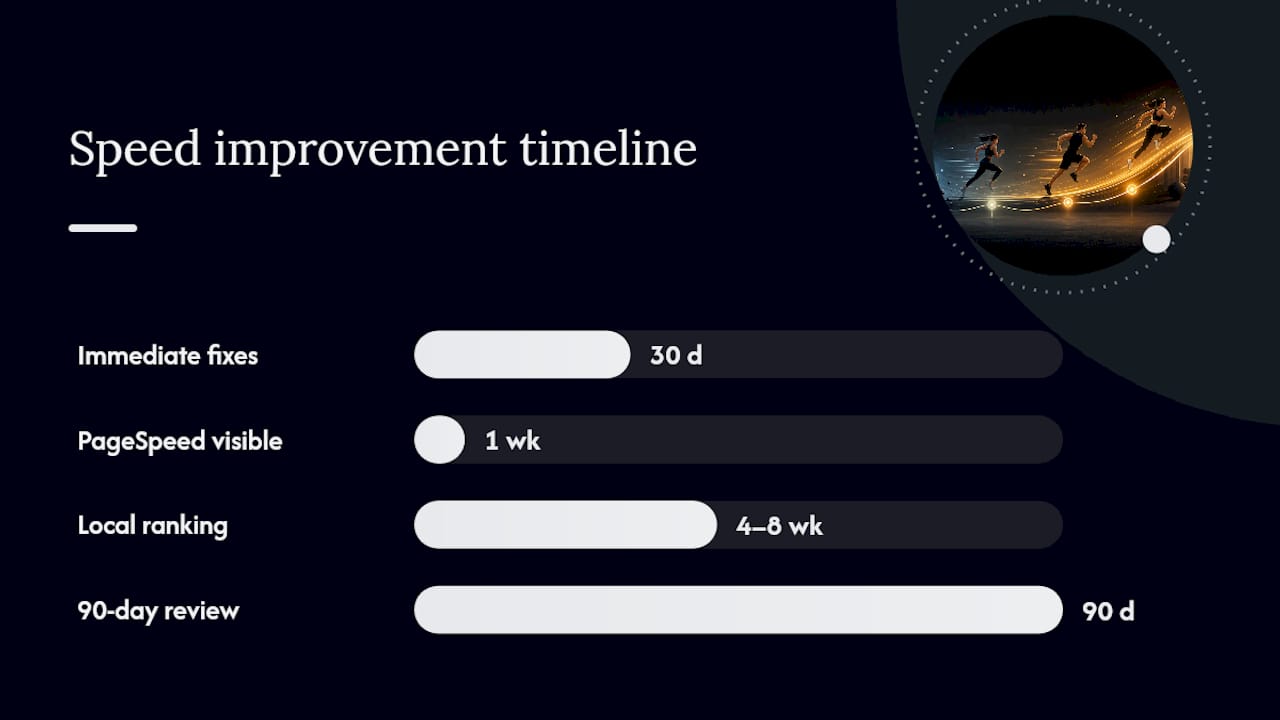
Days 1 to 30 (owner or manager, no developer required):
- Baseline your current LCP, INP, CLS, and PageSpeed score, and save the screenshots.
- Compress and convert all images to WebP or AVIF, starting with the homepage hero and schedule page.
- Audit every plugin and widget; remove anything not actively used.
- Turn on a caching plugin or confirm host-level caching is active.
- Enable lazy loading for offscreen images and defer autoplay video.
Days 30 to 90 (developer or agency task): 6. Evaluate current hosting and migrate to managed hosting or a VPS if Time to First Byte is slow. 7. Set up a CDN with proper cache rules for static assets. 8. Minify and bundle CSS/JS, implement critical CSS, and eliminate render-blocking scripts. 9. Refactor or conditionally load booking widgets and third-party embeds. 10. Re-test all Core Web Vitals and compare against your baseline.
Owners typically see the first 30-day changes reflected in PageSpeed scores within a week, while search ranking movement for local terms tends to show up over 4 to 8 weeks as Google recrawls and re-evaluates. Track leads and trial signups alongside speed metrics so you can attribute gains correctly instead of guessing.
How Enoch Marketing Approaches Gym Website Speed Audits
Enochmarketing runs speed work through the same audit-to-implement-to-measure process it uses for the rest of a gym's marketing stack, because a fast site only matters if it's also driving qualified leads. A speed audit typically identifies the specific images, scripts, and hosting bottlenecks dragging down LCP and INP, then prioritizes fixes by impact, not by what's easiest to bill.
Owners working with Enochmarketing on web design or local SEO get a prioritized fix list rather than a generic report, tied directly to booking and lead volume rather than PageSpeed scores in isolation. The goal isn't a perfect Lighthouse score. It's a site that loads fast enough to keep a prospect on the page long enough to book a trial.
A Publisher's Take on Speed vs. Visuals
Gym owners get told to compress every image, and then they see a competitor's gym with a stunning full-screen hero video and assume they need one too. Here's the actual trade-off: a high-quality hero image or video is worth keeping on a portfolio or gallery page, where visitors are already sold and browsing for inspiration. It's not worth it on your homepage or booking page, where every extra second of LCP delay is a prospect who hasn't decided yet.
My rule of thumb: if the page's job is conversion, speed wins every trade-off. If the page's job is to sell a feeling (your facility tour, your community photos), a heavier but well-optimized visual earns its place. Refresh content seasonally, but re-test speed every time you swap a hero image. A single unoptimized upload can undo a month of fixes in one afternoon.
— Collin
Get Your Gym Website Speed Fixed Without Hiring a Full-Time Developer
There are alternatives to slow DIY fixes or expensive one-off developer projects: gym owners can get a speed audit built specifically around booking conversions, not a generic agency checklist borrowed from unrelated industries.
A first audit typically covers your Core Web Vitals baseline, a plugin and script review, and a prioritized list of fixes ranked by their effect on your booking funnel, paired with local SEO work so the speed gains actually translate into more calls and trial signups. Some agencies focus exclusively on CrossFit gyms and fitness studios, building recommendations around booking widgets, class schedules, and membership funnels rather than generic small-business templates.
If your site is currently costing you leads before a prospect even sees your pricing, book a free strategy session and get a straight answer on what's actually slowing you down.
Essential Tools for Testing Gym Website Speed
Bookmark Google PageSpeed Insights for Core Web Vitals scoring, plus GTmetrix and WebPageTest for waterfall diagnostics. Run all three before and after every major site change to confirm fixes actually moved the numbers.
Sources
- Core Web Vitals
- Fitness Technical SEO Statistics | Web Tonic™
- 8 Gym Website Features Every Fitness Business Owner Needs in 2026