CRM automation is worth adopting for nearly every gym past its first year, because it converts manual front-desk chaos into repeatable revenue. The immediate wins are faster lead follow-up, fewer no-shows, automated billing recovery, and re-engagement sequences that catch members before they cancel. Read on for the specific workflows, integrations, and costs behind a real implementation.
TL;DR:
- Speed-to-lead automation responds within seconds to trial inquiries, significantly increasing lead conversion rates and preventing competitors from hijacking new prospects.
- Automations for no-shows, payment failures, and member drop-offs reduce involuntary churn, preserving revenue and improving attendance consistency.
- Building and testing automation sequences—such as trial follow-up, class reminders, and reactivation workflows—typically takes four to ten weeks and involves ongoing optimization.
- Essential CRM features include real-time integrations with scheduling, payment, and lead capture systems, alongside messaging and member profiles tailored for gym-specific needs.
- Smaller gyms can often implement basic automation themselves, but working with an agency speeds up setup, improves reliability, and ensures automations align with revenue-critical leak points.
Table of Contents
- What CRM Automation Does for Gym Operations
- Which CRM Features Actually Matter for a Gym?
- Ready-to-Use Automation Workflows for Gym Owners
- Integrations and Data Flows: Keeping Every System in Sync
- What a CRM Automation Rollout Actually Costs and Takes
- How to Measure Whether CRM Automation Is Working
- How Enoch Marketing Approaches Gym CRM Automation
- Personalizing Automation Without Sounding Like a Robot
- Data Privacy and Compliance in Gym CRM Systems
- An Honest Take on What Gym Owners Get Wrong About CRM Automation
- Get Help Setting Up CRM Automation for Your Gym
- Sources
- FAQ
What CRM Automation Does for Gym Operations
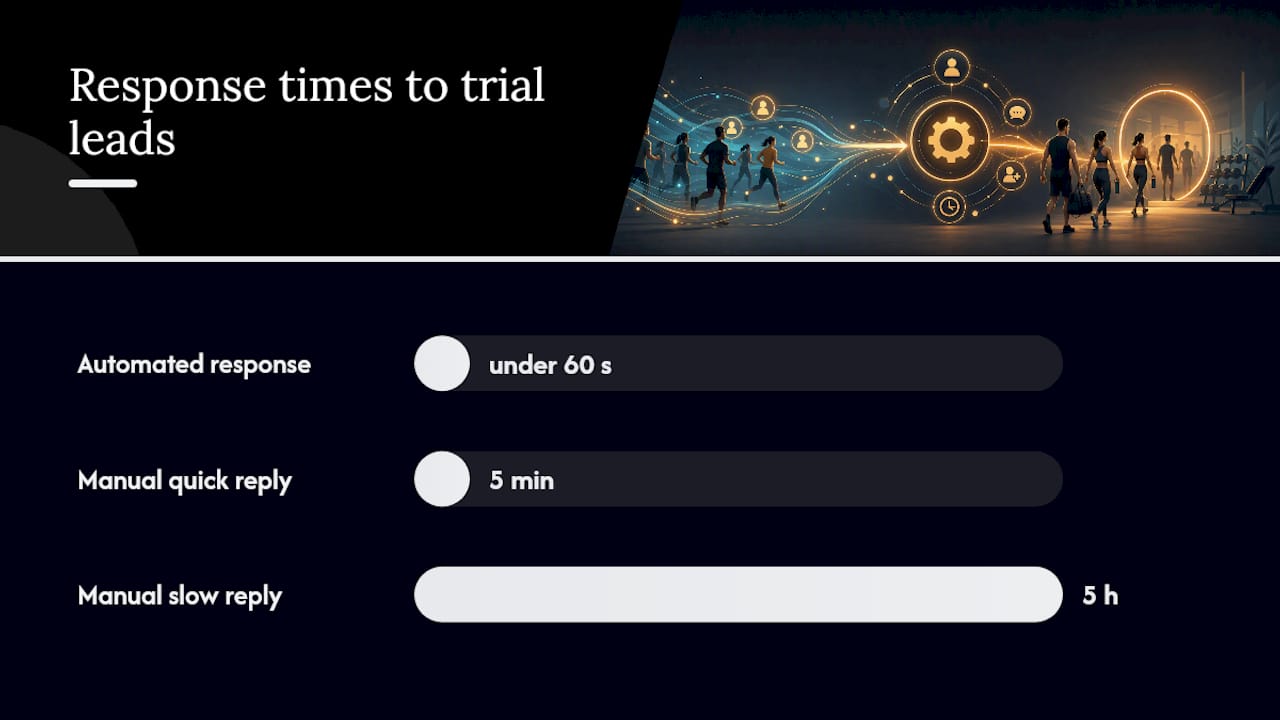
The gap between a gym that responds to a trial lead in 5 minutes and one that responds in 5 hours is not a minor operational detail. It's the difference between closing a membership and losing it to the studio down the street that texted back first. CRM automation for gyms exists to close that gap, along with three other leaks that quietly drain revenue: no-shows, failed payments, and silent churn.
Speed-to-lead is the clearest place automation pays for itself. When someone fills out a trial form at 9 p.m. or during a workout, a human staff member usually isn't watching the inbox. An automated response, sent within seconds and followed by a text offering a booking link, keeps that lead warm while your competitors are still asleep. Gleantap markets its entire fitness CRM around getting inquiries answered in under 60 seconds using automated triggers layered on top of whatever booking system you already run.
No-show reduction comes next. Automated class reminders sent 24 hours and 2 hours before a session, paired with a waitlist that auto-fills a cancelled spot, keep classes full and instructors from teaching to three people instead of fifteen. This matters more than it sounds. A half-empty 6 a.m. class isn't just lost revenue for that hour, it's a signal to the members who did show up that the gym is losing momentum.
Billing automation closes the next leak: involuntary churn. Most member losses aren't a member deciding to quit. They're a card that expired, a payment that bounced, and nobody following up before the account lapses. PushPress and similar platforms build automated retry logic and dunning sequences directly into billing, catching failed payments before they become cancellations.
Then there's retention, which is where most gyms leave the most money unclaimed. A member who hasn't checked in for 14 days is statistically far more likely to cancel than one who visited yesterday, yet most gyms have no system flagging that member until the cancellation email arrives.
What automation actually delivers, in practical terms:
- Trial leads get a response in minutes instead of hours, which raises show-up and conversion rates
- Class reminders and waitlists reduce no-shows and keep attendance data cleaner for capacity planning
- Failed-payment sequences recover revenue that would otherwise silently churn
- Attendance-drop triggers flag lapsing members while there's still time to win them back
- Staff spend less time on repetitive follow-up and more time coaching and closing tours
Speed-to-lead callout: Fitness-focused CRM vendors like Gleantap build their entire pitch around automated responses inside the first minute of an inquiry, because manual follow-up windows of several hours are common in gyms without automation, and every hour of delay works against conversion.
None of this requires ripping out your existing booking software. Layering automation on top of what you have, rather than migrating everything at once, is often the faster path to results.
Which CRM Features Actually Matter for a Gym?
Not every feature on a vendor's homepage matters equally. Some are the backbone of the system. Others are marketing gloss you'll never touch after week one. Here's the priority order, based on what actually moves gym revenue.
- Speed-to-lead capture. The CRM needs to pull leads automatically from web forms, Meta and Google ad integrations, webchat, and phone calls, then trigger an instant response. If a lead sits in an inbox for even an hour, you've likely lost your best shot at converting them.
- A trial-to-membership pipeline with gym-specific fields. Generic sales CRMs track deal stages built for software sales. Gyms need stages like "trial booked," "first class attended," "goal consult scheduled," and custom fields for things like injury notes or preferred class times.
- An automation engine with real triggers. The system should fire actions based on attendance (or lack of it), trial expiration dates, and payment failures, not just calendar dates. Time-based automation alone misses the members who need attention most.
- Two-way SMS and email with deliverability in mind. One-way blasts get ignored. Two-way messaging lets a hesitant trial member text back a question and get a human or automated reply immediately. Watch your sender reputation here. Too many generic blasts and your emails start landing in spam.
- Scheduling and class-capacity management, either native or tightly integrated. Wodify builds scheduling automation directly into its platform, which avoids the sync lag that comes with bolting a separate booking tool onto a CRM.
- Payments and billing automation, including retry logic, refunds, and dunning sequences for failed cards. This is where most involuntary churn gets stopped before it starts.
- Unified member profiles that combine booking history, payment status, and communication logs in one record, especially critical for multi-location operators managing member movement across sites.
- Dashboards for retention and financial reporting, so you can see churn trends and cash flow without exporting five spreadsheets. Monday points to dashboards and multiple views as a core requirement for any CRM built for gym operations, not just a nice extra.
Pro Tip: Before you evaluate any CRM on price, ask for a live demo of the automation builder specifically. A platform can have every feature on this list listed on its website and still require three support tickets to set up a basic trial-follow-up sequence. Watch someone build one in real time.
Ready-to-Use Automation Workflows for Gym Owners
You don't need a developer to build these. Most gym CRMs, including layered tools like Gleantap or all-in-one platforms like Wodify, support all six of these workflows out of the box.
1. Speed-to-lead auto-response and instant booking. The moment a form is submitted or an ad lead comes in, fire an automated text and email within 60 seconds offering a direct booking link for a free trial or consult. Follow with a second touch 2 hours later if no booking happened, and a third the next morning.
2. Trial conversion sequence. This is the sequence that decides whether your trial spend turns into revenue.
- Day 0: Welcome message with class schedule and what to bring
- Day 1 (after first visit): Check-in text asking how it went
- Day 3: Educational email addressing a common objection, like cost or intimidation
- Day 5: Offer to book a goals consult or membership walkthrough
- Day 7 (trial expiring): Direct offer with a deadline, sent by text and email
3. Class reminder and waitlist auto-fill. Reminders go out 24 hours and 2 hours before class. If a member cancels, the system automatically texts the next person on the waitlist with a 15 minute window to claim the spot before it moves to the next name.
4. Failed-payment recovery. When a card declines, the automation should trigger immediately, not wait for a monthly billing run.
- Immediate text and email notifying the member of the failed charge with an update-payment link
- Automatic retry after 48 hours
- A second retry after 5 days paired with a personal outreach task assigned to staff
- Account flagged for freeze or cancellation only after multiple failed attempts and no response
5. Reactivation journey for lapsed attendees. Trigger this the moment a member hits 10 to 14 days without a check-in, before they've mentally checked out.
- A "we miss you" text with no sales pitch, just a genuine check-in
- A follow-up offering a free guest pass or a specific class recommendation based on past attendance
- A final win-back offer, sometimes a discounted month or a bring-a-friend incentive
6. Review and referral automation. After a milestone (10th class, 90 days as a member, a PR hit in a workout), trigger an automated request for a Google review, followed a few days later by a referral incentive prompt. Milestone-based timing outperforms generic monthly asks because it catches members at their most positive moment.
Pair these with lead nurturing strategies tuned specifically for fitness studios, and the conversion sequence above gets noticeably sharper.
Integrations and Data Flows: Keeping Every System in Sync
A CRM is only as good as what feeds it. Disconnected systems create the exact chaos automation is supposed to eliminate: a member who canceled in the billing system but still gets class reminders, or a lead who booked a trial through Facebook but never shows up in the pipeline.
The essential integrations every gym CRM setup needs:
- Scheduling and booking software, so class attendance and cancellations flow into the CRM in real time
- Payment processors like Stripe, since billing failures and successful charges need to trigger automations instantly, not after a delayed nightly sync
- Website lead capture forms, so a form fill becomes a CRM record the second it's submitted
- Ad platforms (Meta and Google), so paid leads route directly into the pipeline instead of sitting in an ad manager inbox nobody checks
- Accounting software, so revenue and churn data reconcile without manual spreadsheet exports
Data mapping matters more than most gyms realize before something breaks. Every system should reference one unique member ID that unifies booking history, payment records, and communication opt-ins under a single record. Skip this step and you'll end up with duplicate profiles, a member who shows up as both "John Smith" and "J. Smith," each with half the history.
There's a real tradeoff between real-time webhooks and batch syncing; choosing the right system often means evaluating the best pickleball club software for US clubs to ensure smooth booking and automation integration. Webhooks push data instantly, which matters for something like a failed payment that needs an immediate text. Batch syncs that run every few hours are fine for less urgent data, like updating a monthly attendance report, but they're the wrong choice for anything time-sensitive.
For gyms with a simple stack, middleware tools like Zapier can connect a booking platform to a CRM without a full migration. For gyms already committed to a platform like Wodify or PushPress, native integrations usually outperform middleware because they update in real time and don't break when a vendor changes their API.
What a CRM Automation Rollout Actually Costs and Takes
Most gym CRM implementations run 4 to 10 weeks from kickoff to full automation, depending on how much data needs cleaning and how many systems need connecting.
- Weeks 1 to 2: Audit and mapping. Review existing member data, identify duplicate records, and map out which systems need to talk to each other.
- Weeks 3 to 5: Build. Set up the pipeline stages, write the automation sequences (trial follow-up, billing recovery, reactivation), and connect integrations.
- Weeks 6 to 7: Testing. Run automations on a small segment, like new leads only, before flipping them on for the whole database.
- Weeks 8 to 10: Full launch and optimization. Roll out to all members, then adjust timing and messaging based on early reply and conversion rates.
Costs vary widely depending on the path:
- DIY setup using a platform's built-in tools typically runs the base monthly software fee only, often in the low hundreds of dollars per month, but eats significant owner or manager time.
- Agency-assisted implementation usually involves a one-time build fee plus an ongoing monthly retainer for the CRM software itself, since the agency configures the automations rather than replacing the platform cost.
- Enterprise or multi-location setups cost more upfront for data migration and staff training across locations.
Budget for hidden costs too: data cleanup if you're migrating from spreadsheets or an outdated system, staff training time, and email deliverability setup so your automated messages don't land in spam folders.
Pro Tip: Run your first automation on a small slice of your database, like just new trial leads, before turning it on for your entire member list. A 4 to 8 week pilot on one workflow is the fastest way to prove ROI before committing to a full rollout.
Before launch, confirm your member data is deduplicated, your integrations are tested with real transactions (not just sandbox data), and at least one staff member understands how to pause or edit an automation if something goes wrong.
How to Measure Whether CRM Automation Is Working
Track a short list of numbers weekly, not a dashboard with forty metrics nobody checks.
Primary KPIs:
| Metric | What it tells you | Check frequency |
|---|---|---|
| Speed-to-lead (response time) | Whether leads get contacted fast enough to convert | Weekly |
| Trial-to-paid conversion rate | Whether your trial sequence is actually closing members | Weekly |
| No-show rate | Whether reminders and waitlists are working | Weekly |
| Monthly churn rate | Whether retention automations are catching lapsing members | Monthly |
| Member lifetime value (LTV) | Whether retention gains are translating into revenue | Monthly |
Secondary metrics worth watching include email and text open/reply rates (a drop signals a messaging or deliverability problem), cost per acquisition on ad-driven leads, and campaign-level ROI for anything you're running through paid channels.
A simple pilot structure works well: pick one workflow, usually trial follow-up since it has the fastest feedback loop, run it for 4 to 8 weeks against a control group still getting manual follow-up, and compare conversion rates. Industry reviews of gym CRM platforms consistently point to short, focused pilots as the fastest way to prove a workflow's value before a full rollout, rather than automating everything at once and hoping it works.
How Enoch Marketing Approaches Gym CRM Automation
Most agency-led CRM builds follow a similar arc: audit the current setup, build a strategy around the gym's specific leak points, launch the automations, then optimize based on real reply and conversion data. The audit stage matters more than gym owners usually expect. It's where you find out that half your "active" trial leads never actually got a second follow-up text.
Enoch Marketing's approach to CRM automation starts with the leads and retention gaps a gym is already losing money on, rather than a generic template. Common builds include trial-to-membership sequences, failed-payment recovery flows, and attendance-drop reactivation campaigns, each tuned to the gym's actual booking and billing systems instead of forcing a swap to new software.
The gyms that get the most out of automation aren't the ones with the fanciest CRM. They're the ones that fixed their worst leak first, whether that's slow lead response or silent billing failures, and built out from there.
The decision between hiring an agency and building it yourself usually comes down to time and technical comfort. A gym owner with a few free hours a week and patience for trial-and-error can build basic sequences inside most native platforms. A gym owner already stretched across coaching, staffing, and sales rarely has that time, and a half-built automation is often worse than none, since it creates the illusion that follow-up is happening when it isn't.
Personalizing Automation Without Sounding Like a Robot
Generic blasts kill engagement faster than almost anything else in a gym CRM. The fix isn't more automation. It's smarter segmentation feeding the automation you already have.
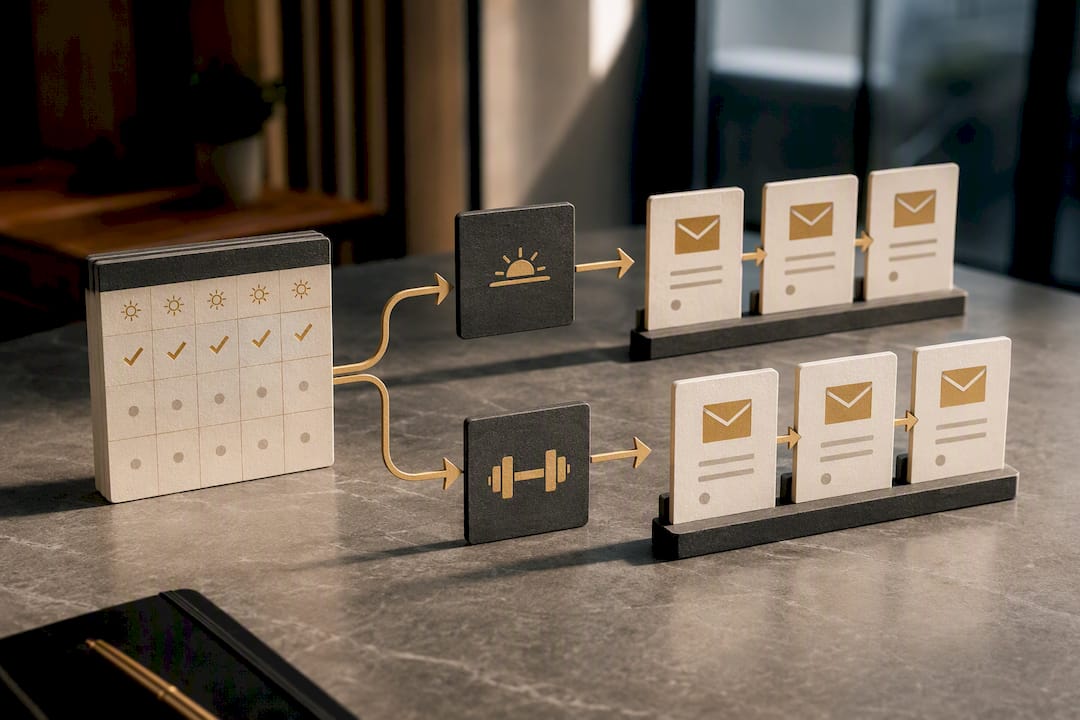
Start with behavior, not demographics. A member who attends 5 a.m. classes every day responds to different messaging than one who shows up sporadically on weekends. Segment your reactivation and reminder sequences by attendance pattern, not just by membership tier.
Use the member's actual first name and reference specific, real details: their last class, their favorite instructor, a PR they hit last month. A text that says "Hey Sarah, saw you crushed that deadlift PR last week, ready for Thursday's class?" converts better than "Don't forget your workout today!" because it proves a human, or at least a system that's paying attention, actually noticed.
Timing matters as much as wording. A trial-expiration offer sent at 6 a.m. lands differently than one sent at 7 p.m. when the member is deciding what to do with their evening. Test send times against your specific member base rather than assuming a default schedule works.
Finally, always give an easy way to opt down in frequency rather than opt out entirely. A member annoyed by too many texts who unsubscribes completely is a member you've lost from every future campaign, including the ones that might have brought them back.
Data Privacy and Compliance in Gym CRM Systems
Gym member data includes contact information, payment details, and sometimes health-related notes like injuries or medical clearances, which raises real privacy obligations depending on where and how a gym operates.
Any gym collecting online lead data from residents of the European Union needs to handle that data according to GDPR principles: clear consent for marketing communications, the ability for a member to request their data be deleted, and limits on how long inactive lead data is retained. Most US-based gyms won't fall under GDPR directly, but any gym running ads or lead forms that could capture EU visitors should still build consent checkboxes into forms rather than assume it doesn't apply.
HIPAA is a narrower concern than many gym owners assume. It generally applies to healthcare providers, insurers, and their business associates, not typical commercial gyms collecting basic fitness intake notes. That said, if a gym partners with a physical therapist or medical provider and shares client health data, that specific data flow may need HIPAA-level protections, so it's worth a conversation with a qualified attorney if that arrangement exists.
At minimum, every gym CRM setup should include explicit opt-in checkboxes for SMS and email marketing, a clear unsubscribe path in every automated message, and a documented data retention policy so old lead and member records don't sit indefinitely without purpose.
An Honest Take on What Gym Owners Get Wrong About CRM Automation
Most gym owners overthink the software choice and underthink the sequence design. The truth is a mediocre CRM with a sharp trial-conversion sequence beats a premium platform running generic, one-size-fits-all messages. The tool matters less than what you tell it to do.
The conventional advice, pick the CRM with the most features, gets this backwards. Feature lists don't retain members. A well-timed text after a missed class does. Prioritize the automation logic first: speed-to-lead, trial follow-up, and failed-payment recovery. Those three alone recover more revenue than any dashboard or reporting feature ever will.
If there's one thing to fix first, it's the trial-to-membership sequence, since it has the fastest feedback loop and the clearest dollar impact. Get that right before touching anything else, including your loyalty program or retention perks. A great loyalty program doesn't matter if half your trials never get a proper follow-up.
— Collin
Get Help Setting Up CRM Automation for Your Gym
You can choose to work with an agency instead of piecing together a CRM yourself between coaching shifts and sales calls. Such teams can offer trial-to-membership sequences, failed-payment recovery flows, and reactivation campaigns tailored for CrossFit gyms and fitness studios, paired directly with the lead funnels and ad campaigns that feed them.
A free strategy call typically starts with a quick audit of your current lead response time, your trial conversion rate, and where your billing or retention automations, if any exist, are leaking members. From there, you'll get a clear picture of what's broken and what a build would actually involve, no generic template pitch. This tends to fit best for gym owners who are already running paid ads or a steady stream of organic leads but have no real system catching those leads once they hit a form or a phone call.
If your gym is losing trial leads to slow follow-up or watching members quietly lapse without a recovery sequence, book a free strategy session through Enoch Marketing's gym growth services and get a straight answer on what to fix first.
Sources
For a closer look at native gym automation features, PushPress shows modular pricing and migration support in practice, while Wodify documents built-in two-way messaging and lead nurturing. monday.com's CRM guide for gyms breaks down the dashboard and automation requirements referenced throughout this article. Use these to verify specific feature claims rather than as a full buying guide, since your own attendance and billing data should still drive the final decision.
- Gym Management Software | PushPress Top-rated gym software
- Wodify gym management features
- CRM for gym
FAQ
What CRM do most gyms use?
There's no single dominant CRM across the industry. Gyms typically choose between all-in-one platforms like Wodify or PushPress, which bundle scheduling, billing, and automation, or a layered CRM like Gleantap added on top of an existing booking system.
Is AI going to replace CRM systems for gyms?
AI is being built into existing gym CRMs as a feature, not a replacement. Tools like RZRV already add AI scheduling and assistant functions on top of the CRM's core automation and messaging engine.
What are the top CRM systems for gyms?
Rather than one universal "best," the right system depends on gym type and size. Industry roundups consistently recommend matching the platform to whether you run a single CrossFit box, a boutique studio, or a multi-location franchise, rather than picking by brand reputation alone.
How much does gym CRM software typically cost?
Pricing varies by vendor and tier. PushPress, for example, offers a free starting tier along with paid Core Pro and Core Max tiers, plus a separate marketing automation add-on, which reflects the modular pricing common across the category.
Should a small gym build its own CRM automation or hire an agency?
A small gym with an owner who has a few spare hours a week and comfort with software can build basic sequences inside most native platforms. Gyms stretched thin on staff time, or ones that want automations tied directly to paid lead campaigns, tend to get faster results working with an agency that specializes in gym marketing.