
Semrush is the strongest all-in-one pick for teams that want a single platform covering rank tracking, site audits, backlink monitoring, and AI visibility. For hyper-local rank precision, Nightwatch covers 107,000+ locations with daily snapshots. Screaming Frog SEO Spider leads for deep technical crawls. Google Search Console and GA4 are non-negotiable baselines for every site. Here is the shortlist by monitoring job:
- Best overall monitoring: Semrush (rank tracking + audits + backlinks + AI visibility in one platform)
- Best rank tracker: Nightwatch (hyper-local, daily, AI visibility across ChatGPT, Gemini, Perplexity)
- Best technical auditor: Screaming Frog SEO Spider (configurable, repeatable, deep diagnostics)
- Best free/basic option: Google Search Console + SEOptimer (first-party indexing data + quick audit checks)
- Best for AI visibility: Profound / Peec AI / Otterly.ai (specialist coverage across multiple LLMs)
- Best for backlinks: Ahrefs (largest active backlink index, Brand Radar for brand monitoring)
- Best for agencies at scale: AccuRanker (fast on-demand updates, clean export workflows)
- Best for real-time on-page change detection: ContentKing (Conductor)
- Best for content teams: Clearscope + Surfer SEO (content scoring tied to ranking data)
- Best managed option for gyms: Enoch Marketing (done-for-you monitoring, alert triage, and membership-focused reporting for CrossFit gyms and fitness studios)
The right choice depends on your primary monitoring job. Tool choice maps directly to team goals: content teams prioritize backlink and content research, local businesses need hyper-local rank precision, and agencies need speed and scale.
Table of Contents
- How do these SEO monitoring tools compare at a glance?
- Detailed profiles of the top SEO monitoring tools
- What do SEO monitoring tools actually track?
- How to pick the right monitoring tool for your team
- How these picks were evaluated
- When should you combine tools, and what does a good monitoring stack look like?
- Key Takeaways
- When buying tools is not the answer
- Enochmarketing handles monitoring and SEO for CrossFit gyms
- Useful sources and product documentation
How do these SEO monitoring tools compare at a glance?
| Tool | Best for | Core monitoring features | Data freshness | GA4 / GSC integration | Free tier / trial |
|---|---|---|---|---|---|
| Enoch Marketing | CrossFit gyms and fitness studios | Managed rank tracking, audits, alerts, GA4 reporting | Ongoing (managed cadence) | Yes (GA4 + GSC integrated) | Free strategy session |
| Semrush | Teams wanting single-pane monitoring | Rank tracking, site audits, backlinks, AI visibility | Daily | Yes | Free tier (limited) |
| Ahrefs | Backlink and content research teams | Rank tracking, site audits, backlink index, Brand Radar | Daily | GSC import | Limited free tools |
| Nightwatch | Multi-location and hyper-local tracking | Rank tracking, AI visibility, SERP snapshots | Daily | Yes | Free trial |
| SEOmonitor | Daily full-depth rank monitoring | Rank tracking (top 100), AI Overview snapshots, SERP history | Daily (full top 100) | Yes | Demo available |
| Screaming Frog SEO Spider | Technical SEOs and large-site crawls | Technical audits, custom extractions, crawl diagnostics | On-demand | GSC integration | Free (up to 500 URLs) |
| ContentKing | Sites needing real-time change alerts | On-page change detection, indexing alerts, content monitoring | Real-time | Yes | Free trial |
| AccuRanker | Agencies tracking thousands of keywords | Rank tracking, on-demand updates, export workflows | On-demand / daily | Yes | Free trial |
| Moz Pro | All-in-one for mid-market teams | Rank tracking, site audits, backlink index, local SEO | Daily / weekly | GSC integration | Free trial |
| SE Ranking | Budget-friendly all-in-one | Rank tracking, audits, backlinks, competitor monitoring | Daily | Yes | Free trial |
| Clearscope | Content optimization teams | Content scoring, keyword monitoring, topic coverage | On-demand | — | Demo available |
| Surfer SEO | On-page content monitoring | Content editor, SERP analysis, keyword density | On-demand | — | Free trial |
| Sitebulb | Technical audit visualization | Crawl audits, visual reports, hint-based diagnostics | On-demand | GSC integration | Free trial |
| seoClarity | Enterprise SEO teams | Rank tracking, audits, AI insights, content intelligence | Daily | Yes | Demo available |
| Profound / Peec AI / Otterly.ai | AI visibility specialists | AI citation tracking across multiple LLMs | Varies by tool | — | Varies |
| Google Search Console + GA4 | All site owners (baseline) | Indexing, coverage, performance, behavior | Near real-time | Native | Free |
| SEOptimer | Quick site health checks | Meta tags, backlinks, robots, page speed | On-demand | — | Free tier |
| Morningscore | Beginners and small businesses | Rank tracking, site health, backlink overview | Daily | GSC integration | Free trial |
| KeySearch | Budget keyword and rank research | Keyword research, rank tracking, competitor analysis | Daily | — | Free trial |
| Yoast SEO | WordPress on-page optimization | On-page SEO checks, readability, schema | On-demand | — | Free (plugin) |
| Rank Math | WordPress SEO monitoring | On-page, schema, rank tracking module | On-demand | Yes | Free (plugin) |
| BuzzSumo | Content and brand monitoring | Content performance, brand mentions, trend tracking | Daily | — | Free trial |
| Ubersuggest | Beginners and small sites | Rank tracking, site audits, keyword research | Daily | — | Free tier |
| Mangools | Beginners and small agencies | Rank tracking (KWFinder), SERP analysis, backlinks | Daily | — | Free trial |
| AnswerThePublic | Content ideation and question monitoring | Search question trends, keyword visualization | On-demand | — | Free tier |
| Seobility | Small to mid-size site audits | Site crawl, on-page checks, rank tracking | Weekly / daily | — | Free tier |
| Gumloop | Automation workflow builders | SEO workflow automation, data pipelines | Varies | API-based | Free tier |
| Claude | AI-assisted SEO analysis | Content analysis, query interpretation, drafting | On-demand | — | Free tier |
| SEO.ai | AI content and optimization | AI content generation, SEO scoring | On-demand | — | Free trial |
| AI Optimization Checker | AEO / AI visibility checks | AI answer presence, featured snippet checks | On-demand | — | Free |
| ScreenshotEngine | Visual SERP capture and audit evidence | Automated SERP screenshots, on-page visual monitoring | On-demand / scheduled | API | Free trial |
| Schemantra | Schema markup monitoring | Schema validation, structured data tracking | On-demand | — | Free tier |
| Rich Results Test | Schema and structured data checks | Rich result eligibility, structured data errors | On-demand | — | Free |
| PageSpeed Insights | Core Web Vitals and performance | Page speed, CWV scores, performance diagnostics | On-demand | — | Free |
| Compress PNG | Image optimization | Image compression for page speed improvement | On-demand | — | Free |
Detailed profiles of the top SEO monitoring tools
Semrush
Semrush covers the full monitoring stack: rank tracking, continuous site audits, backlink monitoring, and content performance in one dashboard. The Semrush One tier adds an AI Visibility Toolkit that tracks brand presence across ChatGPT, Gemini, and other AI engines alongside traditional search results. For teams that want to avoid stitching together five separate tools, that single-pane approach is genuinely hard to beat.
Best for: Marketing teams and agencies that need multi-channel monitoring without managing multiple subscriptions.
Standout feature: AI Visibility Toolkit bundled with traditional SEO monitoring.
Pricing: Free tier available with limited queries. Paid plans start at the Pro level; enterprise pricing on request.
Integrations: GA4, Google Search Console, Semrush API, Slack alerts.
| Pros | Cons |
|---|---|
| All-in-one: rank tracking, audits, backlinks, AI visibility | Can feel expensive for solo practitioners |
| Strong competitor intelligence | Rank tracker less granular than dedicated tools at local level |
| Regular feature updates including AI tracking | Learning curve for new users |
Ahrefs (including Brand Radar)
Ahrefs built its reputation on the backlink index, and it still leads there. The Ahrefs rank tracker handles daily updates across desktop and mobile, and Brand Radar adds brand-level monitoring for how your name appears in search results. Site Audit covers technical health. For teams whose primary monitoring concern is link acquisition and content research, Ahrefs is the natural home base.
Best for: Content and backlink-focused teams.
Standout feature: Backlink index depth and Brand Radar for brand monitoring.
Pricing: Limited free tools available; paid plans tiered by usage. User reviews on G2 consistently highlight data accuracy and the backlink index as top strengths.
| Pros | Cons |
|---|---|
| Industry-leading backlink database | No free full-access trial |
| Brand Radar for brand monitoring | AI visibility features less developed than specialists |
| Strong content research tools | Can be expensive for large keyword sets |
Nightwatch
Nightwatch is purpose-built for rank tracking and does it with unusual geographic depth: 107,000+ locations, daily snapshots, and raw SERP storage for auditability. It also tracks AI visibility across ChatGPT, Claude, Gemini, and Perplexity, which puts it ahead of most dedicated rank trackers on that front. Multi-location businesses and agencies that need zip-code level precision will find the location coverage alone worth the subscription.
Best for: Multi-location businesses and agencies needing hyper-local rank precision.
Standout feature: 107,000+ location coverage with daily snapshots and AI visibility tracking.
Pricing: Free trial available; tiered subscription plans.
Integrations: GA4, Google Search Console, API access.
| Pros | Cons |
|---|---|
| Hyper-local rank tracking at zip-code level | Less comprehensive for site audits |
| AI visibility across major LLMs | Focused tool; needs pairing with a crawler |
SEOmonitor
SEOmonitor's rank tracker uses Dynamic Depth Crawling to check every tracked keyword daily across the full top 100 positions, not just the top 10 or top 20. It stores SERP HTML snapshots and weekly AI Overview snapshots, which matters when you need to audit ranking changes after an algorithm update. For teams where rapid detection and reaction time are the priority, daily full-depth monitoring beats a cheaper tool that only checks the top 20.
Best for: Teams that need day-by-day full-top-100 monitoring with stored SERP histories.
Standout feature: Dynamic Depth Crawling with stored SERP and AI Overview snapshots.
Pricing: Demo available; subscription pricing on request.
| Pros | Cons |
|---|---|
| Daily full top-100 monitoring | Enterprise-oriented pricing |
| Stored SERP and AI Overview snapshots | Less suited for quick one-off audits |
Screaming Frog SEO Spider
Screaming Frog is the crawler that technical SEOs reach for first. The desktop application crawls sites of any size, surfaces broken links, duplicate content, missing meta tags, redirect chains, and canonicalization issues, and supports custom JavaScript rendering and extraction rules. The free version handles up to 500 URLs, which covers most small-site audits. Larger sites need the paid license, but at a flat annual fee it is one of the best-value technical tools on this list.
Best for: Technical SEOs running deep, repeatable crawls on large sites.
Standout feature: Highly configurable crawler with custom extraction and JavaScript rendering.
Pricing: Free up to 500 URLs; paid annual license for unlimited crawling.
Integrations: Google Search Console, GA4, PageSpeed Insights API.
| Pros | Cons |
|---|---|
| Extremely configurable | Desktop-only; no cloud dashboard |
| Free tier covers small sites | No continuous monitoring; crawls are manual |
| Deep technical diagnostics | Steeper learning curve for beginners |
ContentKing (Conductor)
ContentKing monitors your site continuously, not on a weekly schedule. Any on-page change, indexing status shift, or canonical update triggers an alert in near real-time. That speed matters: a CMS deployment that accidentally noindexes a category page can cost days of traffic if you only audit weekly. ContentKing integrates with Slack and email so the right person gets notified immediately.
Best for: Sites with frequent publishing or deployment cycles that need instant change detection.
Standout feature: Real-time on-page change tracking and alerting.
Pricing: Free trial available; subscription tiers based on pages monitored.
| Pros | Cons |
|---|---|
| Real-time monitoring (not batch) | Higher cost for large page counts |
| Immediate alerts on indexing changes | Less depth on rank tracking |
AccuRanker
AccuRanker is the rank tracker agencies reach for when they need to update thousands of keywords on demand and export clean reports for clients. Updates run faster than most platforms, and the on-demand refresh means you can pull fresh data before a client call rather than waiting for a scheduled crawl. The reporting and white-label options are solid for agency workflows.
Best for: Agencies tracking large keyword sets with on-demand update needs.
Standout feature: Fast, accurate on-demand rank updates with clean export workflows.
Pricing: Free trial available; subscription tiers by keyword volume.
Integrations: GA4, Google Search Console, API, Slack.
| Pros | Cons |
|---|---|
| On-demand rank updates | Rank tracking only; needs pairing with an auditor |
| Clean agency reporting and white-label | No free tier |
Moz Pro
Moz Pro covers rank tracking, site audits, backlink analysis, and local SEO in one platform. The Domain Authority metric, while a Moz proprietary score, has become a widely used proxy for site strength across the industry. For mid-market teams that want a well-rounded tool without the complexity of enterprise platforms, Moz Pro is a practical choice.
Best for: Mid-market teams wanting a balanced all-in-one platform.
Pricing: Free trial available; tiered subscription plans.
| Pros | Cons |
|---|---|
| Balanced feature set | Backlink index smaller than Ahrefs |
| Domain Authority widely recognized | Rank tracker less granular than dedicated tools |
SE Ranking
SE Ranking delivers rank tracking, site audits, backlink monitoring, and competitor analysis at a price point that undercuts most all-in-one platforms. Daily rank updates, white-label reporting, and a clean interface make it a genuine option for small agencies and in-house teams watching budgets. The audit depth is solid for most mid-size sites.
Best for: Budget-conscious teams and small agencies needing a full-featured all-in-one.
Pricing: Free trial available; tiered plans starting at a lower price point than Semrush or Ahrefs.
| Pros | Cons |
|---|---|
| Competitive pricing | Smaller backlink database than Ahrefs |
| Daily rank updates | AI visibility features limited |
Google Search Console and Google Analytics (GA4)
These two are not optional. Google Search Console gives you direct indexing data, coverage reports, Core Web Vitals, and search performance by query and page. GA4 ties that search performance to actual user behavior and conversions. Every other tool on this list should integrate with both. Treating them as a standalone monitoring solution is not enough, but skipping them as integrations is a mistake.
Best for: All site owners as a non-negotiable baseline.
Pricing: Free.
Integrations: Native integration with most tools on this list.
Clearscope
Clearscope focuses on content monitoring and optimization: it scores existing content against top-ranking pages for a given keyword and flags gaps in topic coverage. For content teams managing large editorial calendars, it surfaces which pages are drifting below competitive benchmarks before rankings drop.
Best for: Content teams monitoring and optimizing existing page performance.
Standout feature: Content grading tied to real-time SERP analysis.
Surfer SEO
Surfer SEO (SurferSEO) combines a content editor with SERP analysis to guide on-page optimization. Its monitoring angle is content performance: it tracks how pages score against competitors and flags optimization opportunities. Paired with a rank tracker, it closes the loop between content quality and ranking movement.
Best for: On-page content optimization and content-driven rank monitoring.
Sitebulb
Sitebulb is a technical audit tool that presents crawl data visually, making it easier to prioritize fixes than a raw data export. Its hint-based diagnostic system groups issues by severity and impact, which speeds up triage for technical SEOs managing multiple sites. It integrates with Google Search Console for coverage data.
Best for: Technical SEOs who want visual, prioritized crawl reports.
Pricing: Free trial available; desktop and cloud versions.
seoClarity
seoClarity targets enterprise SEO teams with a platform that combines rank tracking, site audits, content intelligence, and AI-assisted insights at scale. The reporting and workflow tools are built for large teams managing thousands of pages across multiple domains.
Best for: Enterprise teams needing scale, automation, and AI-assisted insights.
Morningscore
Morningscore gamifies SEO monitoring with a health score and mission-based task system, making it approachable for beginners and small business owners who find traditional SEO dashboards intimidating. It covers rank tracking, site health, and backlink overview with daily updates and GSC integration.
Best for: Beginners and small businesses new to SEO monitoring.
Pricing: Free trial available.
Profound, Peec AI, and Otterly.ai
These three are AI-visibility specialists. Where all-in-one platforms have added AI tracking as a feature, Profound, Peec AI, and Otterly.ai are built specifically to track how brands appear in AI-generated answers across ChatGPT, Gemini, Perplexity, Claude, and other LLMs. The coverage breadth across engines is wider than what most all-in-ones currently offer. If AI citation tracking is a primary monitoring need rather than a secondary one, a specialist tool is worth the additional cost.
Best for: Brands that need deep, multi-engine AI citation monitoring.
SEOptimer
SEOptimer is a lightweight audit utility that checks meta tags, page speed, backlinks, robots.txt, and basic on-page factors in seconds. User reviews on G2 note it as a fast, accessible diagnostic tool. It is not a continuous monitoring replacement, but it is genuinely useful for quick health checks on a new client site or a page you just published.
Best for: Quick diagnostic checks on small sites or individual pages.
Pricing: Free tier available; paid plans for deeper reporting.
KeySearch
KeySearch is a budget-friendly keyword research and rank tracking tool popular with bloggers and small businesses. It covers keyword difficulty, rank tracking, and basic competitor analysis at a price point well below the major platforms.
Best for: Bloggers and small sites on tight budgets.
Yoast SEO and Rank Math
Both are WordPress plugins that handle on-page SEO monitoring at the page level: meta tags, readability, schema markup, and internal linking. Rank Math adds a rank tracking module and deeper schema support. Neither replaces a dedicated rank tracker or crawler, but for WordPress sites they are the first line of on-page monitoring.
Best for: WordPress site owners managing on-page SEO at the content level.
Pricing: Both have free versions; paid tiers add advanced features.
BuzzSumo
BuzzSumo monitors content performance and brand mentions across the web and social platforms. For content teams tracking how their published pieces perform and where competitors are earning links and shares, it fills a gap that pure rank trackers miss.
Best for: Content and PR teams monitoring brand mentions and content performance.
Ubersuggest and Mangools
Ubersuggest (Neil Patel's tool) and Mangools (KWFinder, SERPChecker, SERPWatcher) both target beginners and small agencies with approachable interfaces and daily rank tracking. Neither matches the depth of Semrush or Ahrefs, but both are solid starting points for teams new to SEO monitoring.
Best for: Beginners and small agencies getting started with rank tracking.
AnswerThePublic
AnswerThePublic visualizes search questions and prepositions around a keyword, making it useful for content ideation and monitoring shifts in how audiences search a topic. It is a research and ideation tool rather than a continuous monitoring platform.
Best for: Content teams monitoring search question trends and ideation.
Seobility
Seobility offers site crawling, on-page checks, and rank tracking with a free tier that covers small sites. It is a practical entry point for small businesses that want basic continuous monitoring without a large budget.
Best for: Small sites needing basic continuous monitoring on a free or low-cost plan.
Gumloop and Claude
Gumloop is a no-code automation platform that SEO teams use to build custom data pipelines, such as pulling rank data from an API and routing alerts to Slack or a reporting dashboard. Claude (Anthropic's AI assistant) is increasingly used for SEO analysis tasks: interpreting crawl data, drafting content briefs, and analyzing SERP patterns. Neither is a monitoring tool in the traditional sense, but both appear in modern SEO workflows as automation and analysis layers.
Best for: Teams building custom SEO automation workflows (Gumloop) or AI-assisted analysis (Claude).
SEO.ai, AI Optimization Checker, and Schemantra
SEO.ai combines AI content generation with SEO scoring, useful for teams producing content at scale who want optimization guidance built into the writing process. AI Optimization Checker focuses on whether content is optimized for AI-generated answers and featured snippets. Schemantra handles schema markup monitoring and validation, tracking structured data health across a site.
Best for: Content production at scale (SEO.ai), AEO/AI answer optimization (AI Optimization Checker), structured data monitoring (Schemantra).
Rich Results Test, PageSpeed Insights, and Compress PNG
These three are free Google tools and utilities that belong in any technical monitoring workflow. Rich Results Test validates schema markup and structured data eligibility. PageSpeed Insights scores Core Web Vitals and performance diagnostics. Compress PNG handles image compression, which directly affects page load times and CWV scores.
Best for: Technical monitoring checks on schema, performance, and image optimization.
Pricing: All free.
ScreenshotEngine
ScreenshotEngine provides an API for capturing automated screenshots of SERPs and web pages on a schedule. Pairing visual SERP capture with a rank tracker gives you verifiable evidence of how your pages appear in search results over time, which is useful for audits, client reporting, and detecting SERP feature changes.
Best for: Teams needing automated visual evidence of SERP appearances and on-page changes.
What do SEO monitoring tools actually track?
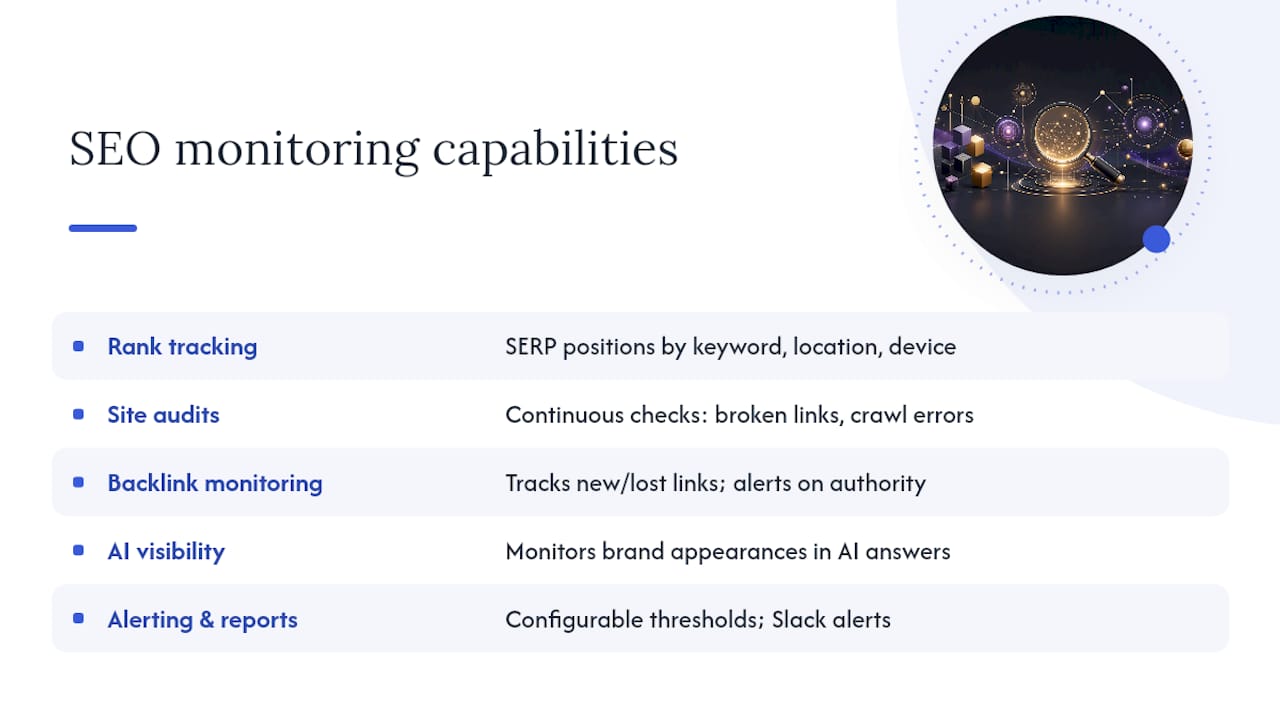
SEO monitoring tools cover several distinct capability layers. Understanding what each layer does helps you map tool features to the business outcomes you actually care about.
Rank tracking monitors where your pages appear in search results for target keywords, across locations, devices, and search engines. A sudden drop in position 3 to position 14 is the kind of signal that should trigger an immediate audit, not a weekly report.
Continuous site audits check technical health on an ongoing basis: broken links, crawl errors, redirect chains, duplicate content, missing canonical tags, and indexing issues. The difference between a weekly crawl and real-time monitoring (like ContentKing) is reaction time. A deployment that accidentally noindexes your top-traffic pages can go undetected for days on a weekly schedule.
Backlink monitoring tracks new and lost links pointing to your site. A sudden loss of high-authority backlinks often precedes a ranking drop. Ahrefs and Semrush both alert on link changes, though their index sizes differ.
AI visibility monitoring is the newest layer. It tracks whether and how your brand appears in AI-generated answers from ChatGPT, Gemini, Perplexity, and Claude. As AI-generated answers capture more search real estate, this layer is moving from optional to expected in most SEO stacks.
On-page change detection flags when content, meta tags, or structural elements on your pages change, whether from a CMS update, a developer push, or a third-party script. ContentKing is the specialist here.
Performance and Core Web Vitals monitoring tracks page speed, Largest Contentful Paint, Cumulative Layout Shift, and Interaction to Next Paint. PageSpeed Insights gives you a snapshot; integrating CWV data into a continuous monitoring workflow requires connecting it to GA4 or a dedicated performance tool.
Alerting and reporting is what converts raw monitoring data into action. The best monitoring setup in the world is useless if alerts go to an inbox nobody checks. Configurable thresholds, Slack integrations, and white-label reporting for clients are features worth evaluating carefully during trials.
Data freshness matters more than most buyers realize. Daily full-top-100 monitoring, as SEOmonitor's Dynamic Depth Crawling provides, catches algorithm impacts the same day they happen. Weekly snapshots can leave you reacting to a problem that is already a week old.
How to pick the right monitoring tool for your team
The right tool is the one that matches your primary monitoring job, your team's bandwidth, and your budget. Here is a prioritized checklist to work through before committing to a trial:
-
Define your primary monitoring job. Rank tracking, technical audits, backlink monitoring, AI visibility, and content monitoring are different jobs. A tool that does all of them adequately may do none of them as well as a specialist. Start with the job that costs you the most when it goes wrong.
-
Assess data freshness needs. If you manage a high-traffic site or run paid campaigns tied to organic rankings, daily updates matter. If you run a small blog, weekly is probably fine. Ask vendors specifically: how often are rankings updated, and do you store raw SERP snapshots?
-
Check local and geographic precision. Multi-location businesses and local SEO campaigns need zip-code or city-level rank data. Nightwatch's 107,000+ location coverage is the benchmark here. Most all-in-ones track at the country or region level by default.
-
Verify AI visibility tracking. If your brand competes in categories where AI-generated answers are common, confirm whether the tool tracks AI Overview appearances and citations across ChatGPT, Gemini, and Perplexity, and how frequently those snapshots are updated.
-
Confirm API access and integrations. GA4 and Google Search Console integrations are table stakes. API access matters if you want to pipe data into a custom dashboard or automate reporting. Ask whether the API is included in base plans or costs extra.
-
Evaluate alerting configuration. Can you set custom thresholds (e.g., alert when a top-10 keyword drops more than 5 positions)? Can alerts route to Slack, email, or a webhook? Alerting quality separates monitoring tools from reporting tools.
-
Consider white-label and collaboration needs. Agencies need white-label reports. In-house teams need multi-user access. Confirm seat limits and report customization before signing.
-
Test support and onboarding. A tool with poor documentation or slow support becomes a liability during an incident. Check G2 and Capterra reviews specifically for support quality, not just feature ratings.
Vendor questions to ask during trials:
- How often are rankings updated, and can I trigger on-demand refreshes?
- Do you store raw SERP HTML snapshots, and for how long?
- Can the tool track AI Overview appearances and AI citations?
- How granular is local tracking (country, city, zip code)?
- Is API access included, and what are the rate limits?
Red flags to watch for:
- Rank tracking limited to top 20 positions only
- No raw SERP snapshot storage
- No API or API locked behind enterprise tiers
- Pricing that changes significantly with keyword volume
- No GA4 or GSC integration
Decision flow by goal:
Agencies managing multiple clients should prioritize AccuRanker or Semrush for scale, white-label reporting, and on-demand updates. Local businesses with multiple locations need Nightwatch or a tool with genuine zip-code precision. Enterprise in-house teams with large page counts should evaluate seoClarity or Semrush alongside a dedicated crawler like Screaming Frog or Sitebulb. Small in-house teams or solo practitioners can start with SE Ranking or Morningscore and add Google Search Console as the free backbone.
How these picks were evaluated
Every tool on this list was assessed against a consistent set of criteria. No tool was included based on brand recognition alone.
Evaluation factors:
- Support quality: — Third-party review platforms (G2, Capterra) were consulted for user-reported support experiences.
Testing scope: Product UIs were reviewed, update frequencies verified against vendor documentation, local tracking capabilities confirmed where publicly stated, and AI visibility features checked against product pages and third-party roundups. Pricing was verified at the time of writing but is subject to change; enterprise pricing typically requires direct vendor contact.
Sources consulted: Vendor product pages, official documentation, G2 and Capterra review pages, and third-party roundups including Linkilo's 2026 monitoring tools breakdown and the ScreenshotEngine roundup. Pricing volatility and enterprise quoting mean specific dollar figures were not included unless publicly listed.
When should you combine tools, and what does a good monitoring stack look like?
No single tool does everything well. The category breakdown across all-in-ones, dedicated rank trackers, crawlers, and AI-visibility specialists reflects a real trade-off: breadth versus depth. Here is how to think about building a stack rather than picking one tool.
Common stack patterns:
- All-in-one + dedicated rank tracker: — Semrush or SE Ranking for audits, backlinks, and reporting, paired with AccuRanker or Nightwatch for faster, more granular rank data. This is the most common agency setup.
- All-in-one + real-time change detector: — Semrush or Ahrefs as the primary platform, with ContentKing layered on top for instant on-page change alerts. Useful for large sites with active development teams.
Cost vs. accuracy trade-offs:
Dedicated rank trackers generally deliver higher accuracy and faster updates than the rank modules inside all-in-one platforms. The gap narrows for moderate keyword volumes but widens at scale. If you are tracking thousands of keywords across multiple locations, a dedicated tracker pays for itself in data quality. For smaller sites, an all-in-one's rank module is usually sufficient.
Stack templates by team type:
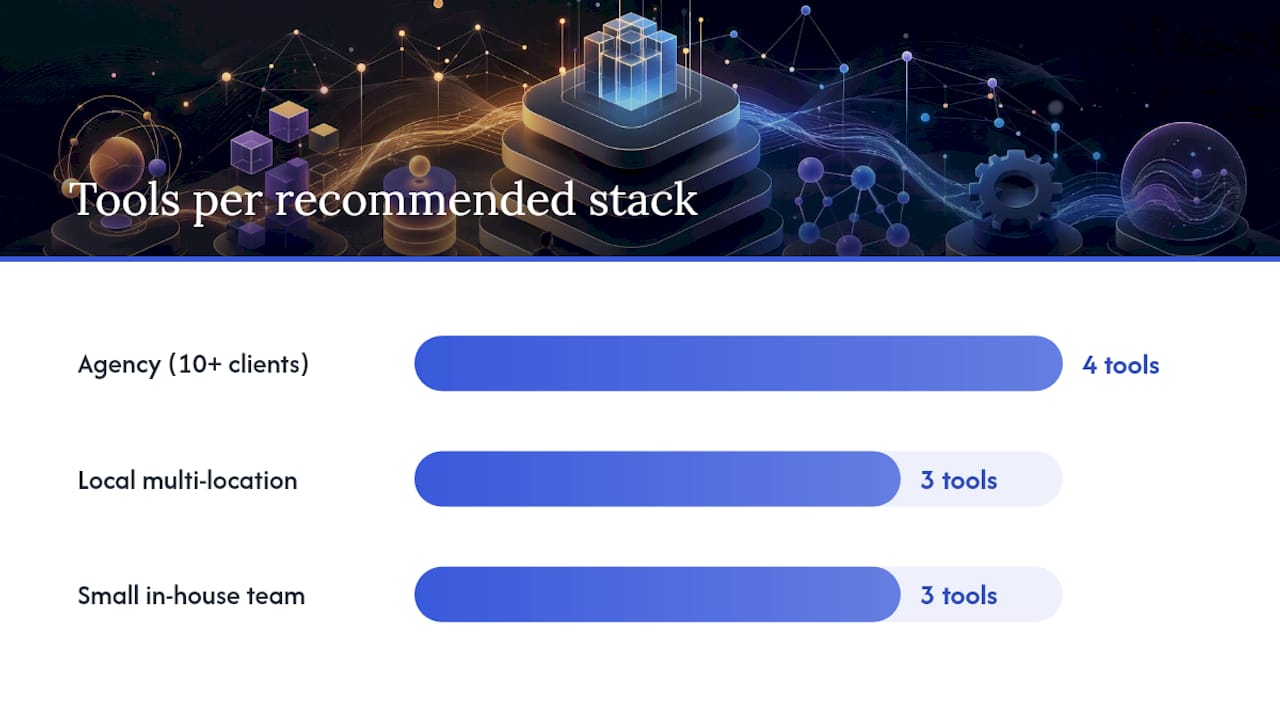
Agency (10+ clients): Semrush (primary platform) + AccuRanker (rank precision) + ContentKing (change alerts) + ScreenshotEngine API (visual SERP evidence for client reports).
Local multi-location business: Nightwatch (hyper-local rank tracking) + Screaming Frog (quarterly technical audits) + Google Search Console (free baseline).
Small in-house team: SE Ranking or Morningscore (all-in-one) + Google Search Console + GA4. Add Screaming Frog's free tier for periodic technical checks.
Pro Tip: Store raw SERP snapshots from Nightwatch or SEOmonitor and tie them to GA4 conversion events. When a ranking change correlates with a traffic drop, you have the SERP evidence to show exactly what changed and when, which speeds up root-cause analysis and makes client reporting far more credible. Competitor tracking workflows that include SERP snapshots give you the same advantage for competitive analysis.
Key Takeaways
The strongest monitoring stacks combine a daily rank tracker with a technical crawler and GA4 integration, then layer in AI visibility tracking as a third tier for brands where LLM citations matter.
| Point | Details |
|---|---|
| Match tool to monitoring job | Rank tracking, technical audits, AI visibility, and backlinks are distinct jobs; one all-in-one rarely leads in all four. |
| Prioritize data freshness | Daily full-top-100 monitoring catches algorithm impacts the same day; weekly snapshots leave you reacting too late. |
| GA4 and GSC are non-negotiable | Every tool on this list should integrate with both; they are the free baseline every monitoring stack needs. |
| AI visibility is now a core layer | Tracking brand citations in ChatGPT, Gemini, and Perplexity is moving from optional to expected in most SEO workflows. |
| Enochmarketing for gym owners | Enochmarketing offers done-for-you monitoring, alert triage, and membership-focused reporting for CrossFit gyms and fitness studios. |
When buying tools is not the answer
The conventional wisdom in SEO circles is that every team should own its monitoring stack. Buy the tools, set up the dashboards, configure the alerts, and act on the data. That advice is right for teams with a dedicated SEO practitioner who has the bandwidth to triage signals and translate them into campaigns.
Most gym owners and fitness studio operators are not that team. They are running classes, managing staff, and trying to grow memberships. A rank tracking dashboard that nobody checks weekly is not a monitoring system; it is a subscription that generates guilt.
The real question is not which tool to buy. It is whether the person who will receive the alerts has the time and expertise to act on them. Ranking volatility, a sudden backlink loss, or a technical crawl error each require a different response. If your team cannot distinguish between a penalty, a SERP feature change, and a competitor gaining ground, the monitoring data is noise.
Managed SEO services exist precisely for this gap. The value is not the data; it is the triage and the action. A managed partner who understands your market, your competitive set, and your conversion funnel turns monitoring signals into campaigns and fixes, not just reports. For fitness businesses specifically, that means someone who knows what drives gym memberships in your local market, not just someone who can read a rank tracker.
The signal that you need a managed partner rather than more tools: you already have monitoring data and you are not acting on it consistently. That is not a tool problem.
Enochmarketing handles monitoring and SEO for CrossFit gyms
Running a CrossFit gym means your marketing time is limited, and most SEO tools are built for marketing teams, not gym owners. Enochmarketing is the done-for-you alternative: a managed monitoring and SEO service built exclusively for CrossFit gyms and fitness studios across the United States.
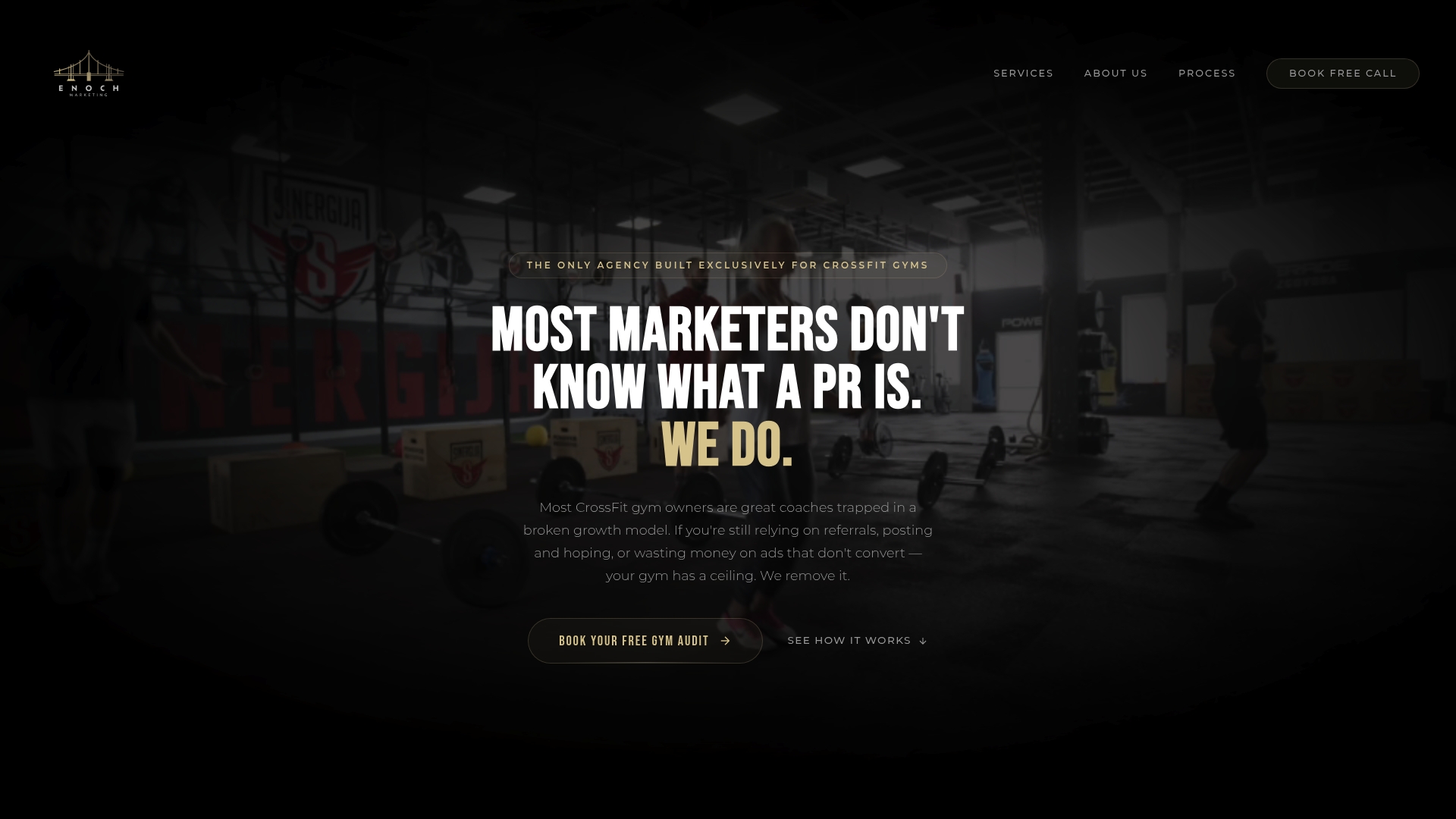
A managed package with Enochmarketing includes ongoing rank and site health monitoring, alert triage (so issues get fixed, not just flagged), GA4 integration, monthly ROI reporting tied to membership growth, and campaign recommendations based on what the data actually shows. The focus is on members and revenue, not dashboard metrics. For gym owners who want local SEO that converts rather than a tool they need to learn, this is the practical alternative to building and managing a monitoring stack yourself.
See what a managed package includes and what it costs at Enochmarketing's services and pricing pages, or book a free strategy session to get a read on where your gym's SEO currently stands.
Useful sources and product documentation
The following pages were consulted in building this list and are worth bookmarking for technical detail and ongoing reference.
- Rank Tracker: 107,000+ Locations | Nightwatch
- Rank Tracker: Unified SEO + AI Search Performance | SEOmonitor
- Best SEO Monitoring Tools in 2026 and How to Pick the Right One for Your Business | Linkilo
- The 12 Best SEO Monitoring Tools for Unbeatable Insights in 2026 - ScreenshotEngine Blog
- Semrush SEO Toolkit: Check Website SEO with Analysis Tools
- Best SEO Tools for Keyword Research & Audits | TechnologyAdvice
- Ahrefs reviews | G2
- SEOptimer reviews | G2