
The primary category on your Google Business Profile is the single strongest local ranking signal you control, and the rule is simple: pick the most specific category that matches what you actually sell. If you run a straightforward gym, choose "Gym." If you run a boxing program, use "Boxing Gym" rather than broader categories like "Gym" or "Fitness Center." You get one primary category plus several secondary ones, and the primary carries the most weight by far.
TL;DR:
- Choosing the most specific primary category that accurately describes the business significantly improves local search visibility and relevance.
- Relevant secondary categories support the primary choice, but overloading with unrelated ones dilutes the profile's focus and effectiveness.
- Updating categories should be based on actual service offerings, competitor analysis, and search intent, not assumptions or default options.
- Category changes take days to weeks to impact rankings, so tracking impressions and local pack positions helps measure effectiveness.
- Regular auditing of categories, website language, and reviews ensures sustained alignment and maximizes local SEO performance.
Table of Contents
- What's the Best GMB Category for a Gym?
- How Do You Choose the Right Primary GBP Category?
- What Can You Learn From Competitor GBP Categories?
- How Do You Add or Edit Categories in Google Business Profile?
- What Category Mistakes Hurt Gym Visibility?
- How Long Do Category Changes Take to Show Results?
- Copy-Ready GBP Category Setups for Ten Gym Types
- Where Category Choices Fit Inside a Real Local-SEO Program
- Get Your GBP Category and Local Visibility Fixed Together
- Where to Verify GBP Category Rules Yourself
- Sources
What's the Best GMB Category for a Gym?
Google gives every business one primary category and room for up to nine additional categories, and the official category guidance is blunt about the priority: choose the most specific option available, not the safest-sounding one. That single sentence causes more confusion for gym owners than almost anything else in local SEO. Owners default to "Gym" because it feels like the obvious umbrella term, but choosing a narrower category that matches exactly what a searcher typed is often smarter.
Here's why specificity wins. Google's category system acts as a matching filter between what someone searches and what your business does. Someone typing "boxing gym near me" is shown listings whose primary category signals boxing, not general fitness. A gym labeled simply "Gym" can still show up, but it's competing on a wider, noisier field against every other fitness business in town. A gym labeled "Boxing Gym" gets first crack at anyone specifically hunting for boxing.
The primary category isn't just a label. Google's own documentation on Business Profile attributes and categories describes it as a core classification signal that shapes where and how often your profile surfaces in Maps and Search. Your secondary categories matter too, but they play a supporting role. Think of the primary as the headline and the secondaries as the subtext.
Below, you'll find copy-ready templates for the gym models owners ask about most: commercial gyms, boutique strength studios, CrossFit boxes, boxing and martial arts gyms, yoga and Pilates studios, personal training businesses, cycling studios, dance schools, and multi-discipline centers.
Commercial or full-service gym Primary category: Gym Secondary categories: Fitness center, Personal trainer, Weight loss service Rationale: When your offering spans free weights, machines, classes, and training, "Gym" is genuinely the most accurate primary. Layer in secondaries that reflect real revenue lines, not aspirational ones.
Boutique strength or barbell club Primary category: Gym Secondary categories: Personal trainer, Physical fitness program, Weightlifting area Rationale: There's no dedicated "strength gym" category in most regions, so "Gym" stays primary, but your secondaries should carry the strength-specific language your customers actually search.
CrossFit or functional fitness box Primary category: Gym Secondary categories: Physical fitness program, Personal trainer, Fitness center Rationale: CrossFit-branded categories aren't standard in the GBP category list, so precision here comes from pairing "Gym" with functional-training secondaries and reinforcing the niche through your business name, description, and service pages rather than the category field alone.
Boxing gym Primary category: Boxing Gym Secondary categories: Personal trainer, Physical fitness program, Martial arts school Rationale: This is the cleanest example of specific beating general. "Boxing Gym" exists as its own category, so using "Gym" instead is leaving relevancy on the table for no reason.
Martial arts or MMA gym Primary category: Martial arts school Secondary categories: Boxing gym, Self defense school, Personal trainer Rationale: If you teach BJJ, Muay Thai, or mixed disciplines, "Martial arts school" reads more accurately to Google than "Gym," and it matches how most students actually search.
Yoga studio Primary category: Yoga studio Secondary categories: Pilates studio, Meditation center, Fitness center Rationale: Owners sometimes default to "Fitness center" because it sounds bigger. It's the wrong instinct. "Yoga studio" is a defined, high-intent category that directly matches the search term people use.
Pilates studio Primary category: Pilates studio Secondary categories: Yoga studio, Physical fitness program, Personal trainer Rationale: Same logic as yoga. If Pilates is your core offering, don't bury it under "Gym."
Personal training business (no storefront gym floor) Primary category: Personal trainer Secondary categories: Physical fitness program, Weight loss service, Nutritionist Rationale: A studio built around one-on-one or small-group coaching, without open gym access, should lead with "Personal trainer" rather than "Gym," since that's the service being sold.
Cycling or spin studio Primary category: Physical fitness program Secondary categories: Gym, Fitness center, Personal trainer Rationale: There's no dedicated "spin studio" category, so pair the closest general match with secondaries that hint at group fitness intensity.
Dance fitness school Primary category: Dance school Secondary categories: Physical fitness program, Fitness center, Personal trainer Rationale: If dance is the core product, whether it's cardio dance, barre, or a hybrid format, "Dance school" reflects the actual customer intent better than a generic fitness label.
Multi-discipline center (gym plus yoga plus classes under one roof) Primary category: Gym Secondary categories: Yoga studio, Fitness center, Personal trainer, Physical fitness program Rationale: When you genuinely offer several disciplines at real volume, "Gym" as primary with a stacked secondary list is the right call. Trying to primary-category your way into representing everything at once just dilutes your signal.
Across every template above, the pattern repeats: match your primary category to the thing customers would say out loud if a friend asked what kind of gym you run. If the honest answer is "it's a boxing gym," your primary category should say boxing gym.
How Do You Choose the Right Primary GBP Category?
Choosing the right category isn't a guessing game if you work through it in order. Skipping steps is what leads owners to pick "Gym" by default and never revisit it.
- Define what you actually sell. Write down your core revenue driver in one sentence. Not your mission statement, your actual product: memberships to a strength gym, drop-in boxing classes, one-on-one training packages.
- Match that sentence to real search language. Think about what a new customer would type into Google, not what you'd put on a brochure. "24 hour gym near me" and "boxing classes near me" pull from different intent pools even if your business could serve both.
- Check what categories actually exist inside your GBP dashboard. Third-party lists of Google categories float around online, but Google updates its category list regularly, so the only reliable source is the live selector inside your own profile editor.
- Look at what competitors in your market are using. If every successful boxing gym near you is categorized as "Boxing Gym" and you're the lone "Gym," that's a signal worth acting on, not ignoring.
- Weigh specificity against genuine search volume. If the specific category exists but almost nobody searches that exact term in your area, a broader category with more search volume can be the smarter call. This is the one place where sacrificing some specificity is defensible.
When you're stuck between two reasonable options, prioritize the category that reflects the highest-intent, highest-conversion search behavior. A category matching someone actively shopping for your exact service beats one that only casts a wider net.
Pro Tip: If you're torn between two categories and the search demand looks roughly equal, pick the one your top three local competitors are NOT using. Differentiation in a crowded category list can be worth more than chasing the exact same label everyone else has.
Sacrifice specificity only when the narrow category would functionally hide you from the volume of searches you actually need to survive on. A tiny cycling studio in a small town might get more real traffic from "Gym" than from a barely-searched niche term, even though the niche term is technically more accurate.
What Can You Learn From Competitor GBP Categories?
Pull up Google Maps, search your core service plus your city, and open each competitor's profile. Their categories show right under the business name, and that alone tells you more about local category norms than any generic blog post.
Do this for the top five to eight competitors in your specific niche, not every gym in town. A boxing gym should study other boxing gyms, not the 24 hour commercial chain three exits down. Note which primary category each one uses, and look for patterns rather than one-off outliers.
Browser extensions like the one available on the Chrome Web Store can speed up scanning multiple profiles if you're auditing a dozen or more competitors at once, though this is a convenience tool, not a requirement. Manual checking works fine for most single-location gyms. Use these tools to save time, never to scrape at a scale that risks violating platform terms.
- If your niche competitors overwhelmingly use one specific category and you don't, that's a strong signal you're miscategorized.
- If competitors are scattered across three or four different categories, that usually means the "correct" answer is genuinely ambiguous, and your own judgment about search intent should drive the decision.
- If a dominant competitor uses a broad category like "Gym" despite an obvious niche fit, don't assume they know something you don't. Plenty of profiles are simply set up wrong and never revisited.
- Sharing a Maps profile link with a business partner or consultant makes it easy to compare notes on what a competitor's listing actually shows.
Matching competitors makes sense when their category choice reflects genuine specificity you'd overlooked. Differentiating makes sense when the whole local pack is settling for a generic category out of habit. Use competitor data as a tie-breaker, not a shortcut around your own analysis, and never copy a category just because a competitor has it if that category doesn't actually describe your business.
How Do You Add or Edit Categories in Google Business Profile?
Changing your category takes about two minutes once you're in the right menu. Here's the exact path.
- Sign in to your Google Business Profile manager, either through the Google Business app or by searching your business name on Google and clicking into the profile management view.
- Select "Edit profile," then find the "Business information" or "About" section depending on your interface version.
- Locate the "Business category" field. Your current primary category displays first, with an option to change it.
- Click into the primary category field and start typing. Google will suggest matching categories as you type; you must select from this list since custom categories aren't allowed.
- Scroll to "Additional categories" or "Also listed as" to add secondary categories, up to nine total.
- Save your changes. Most edits apply automatically, though Google occasionally flags a change for review, particularly on newer or recently verified profiles.
A few things trip owners up here. First, if your business isn't fully verified, category edits may sit in a pending state longer than expected. Second, Google sometimes generates "suggested edits" from third parties, including category suggestions you didn't make. Check your profile's edit history periodically so a stray suggested edit doesn't quietly overwrite your primary category. Third, if a category you expect to see doesn't appear in the search suggestions, it may not exist in Google's current list for your business type or region. Don't force a mismatch. Pick the closest accurate option instead.
What Category Mistakes Hurt Gym Visibility?
Most category damage is self-inflicted, and it's almost always one of a handful of repeat offenses.
- Piling on irrelevant secondary categories. Adding "Spa" or "Nutritionist" because you sell protein shakes at the front desk dilutes your profile's topical focus without adding real search value.
- Using a category as a marketing slogan. There's no "best gym in town" category. Categories are functional classifications, not ad copy, and Google's system doesn't reward creative interpretation.
- Defaulting to broad when specific exists. This is the single most common mistake in this article's subject matter: choosing "Gym" or "Fitness center" when "Boxing Gym," "Yoga studio," or "Pilates studio" would have been more accurate and more competitive.
- Ignoring suggested edits from the public. Anyone can propose an edit to your listing, and if you're not monitoring your profile, an inaccurate suggested category change can quietly go live.
- Letting category and website messaging drift apart. If your GBP says "Gym" but your homepage only talks about boxing classes, that inconsistency confuses both customers and Google's matching systems.
Pro Tip: Set a calendar reminder every quarter to log into your profile and confirm your categories still match your current service mix. Businesses that add a new class type or drop a service often forget the category field entirely.
How Long Do Category Changes Take to Show Results?
Category edits typically start influencing local visibility within a few days to a few weeks, though the full effect can take longer to stabilize. There's no fixed countdown clock Google publishes, so the honest answer is: expect gradual movement, not an overnight jump.
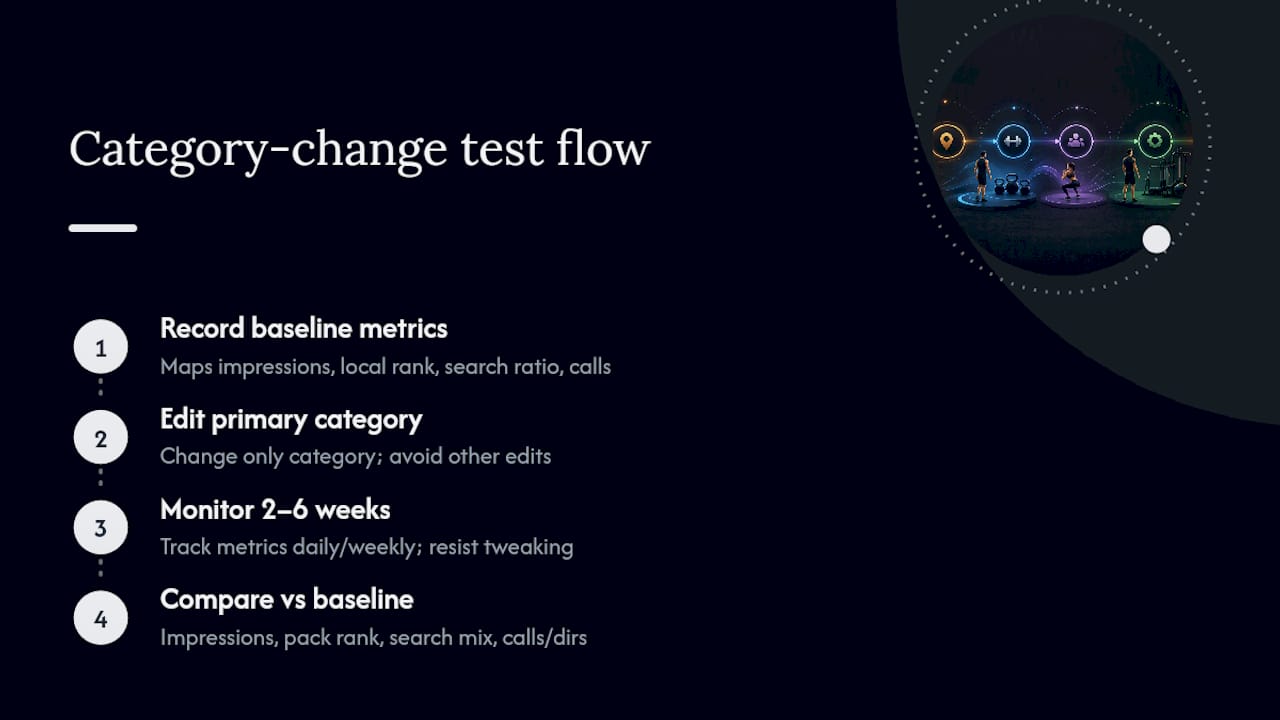
Track four things to know whether a change actually worked: Maps impressions for your profile, your local pack ranking position for target search terms, the ratio of branded searches (people typing your gym's name) versus category searches (people typing "boxing gym near me"), and the raw count of calls and direction requests coming through your profile.
Run it as a real test, not a set-it-and-forget-it edit. Record your baseline numbers for those four metrics before you touch anything. Make the category change. Then wait, resisting the urge to tweak other profile fields at the same time, since that muddies your ability to isolate what the category change actually did. Give it two to six weeks of monitoring before comparing against your baseline. If category searches and local pack visibility improve while branded searches stay flat, that's a clean signal the change is working, not just general momentum from something else you did that month.
Copy-Ready GBP Category Setups for Ten Gym Types
These are condensed, paste-into-GBP versions of the earlier templates, plus guidance for edge cases owners frequently ask about.
- 24-hour commercial gym: Primary: Gym. Secondaries: Fitness center, Personal trainer, Weight loss service. Works because breadth of offering matches breadth of category.
- Powerlifting or strongman gym: Primary: Gym. Secondaries: Personal trainer, Physical fitness program, Weightlifting area. The niche shows up through secondaries and site copy since no dedicated powerlifting category exists.
- CrossFit-style functional box: Primary: Gym. Secondaries: Physical fitness program, Personal trainer, Fitness center. Reinforce the CrossFit identity through your business description and local SEO service pages rather than the category field.
- Boxing gym with retail apparel: Primary: Boxing gym. Secondaries: Personal trainer, Sporting goods store. Keep retail as a distant secondary, never primary, since your core identity is training, not sales.
- Brazilian jiu-jitsu academy: Primary: Martial arts school. Secondaries: Self defense school, Personal trainer, Boxing gym (if you also offer striking).
- Hot yoga studio: Primary: Yoga studio. Secondaries: Meditation center, Fitness center. Skip "Sauna" as a secondary unless the heated room is a standalone bookable amenity, not just the studio environment.
- Reformer Pilates studio: Primary: Pilates studio. Secondaries: Yoga studio, Physical fitness program, Personal trainer.
- Solo personal training studio: Primary: Personal trainer. Secondaries: Physical fitness program, Nutritionist, Weight loss service.
- Indoor cycling studio: Primary: Physical fitness program. Secondaries: Gym, Fitness center. If you also run a small retail counter for cycling shoes or gear, that stays a low-priority secondary, never primary.
- Multi-location fitness brand with a gym, a yoga room, and a physical therapy partnership: Primary: Gym. Secondaries: Yoga studio, Physical fitness program, Physical therapist (only if therapy is delivered on-site by a licensed provider, not just referred out). Set each location's profile independently since categories don't have to match across locations if service mix genuinely differs.
For multi-location operators, resist the instinct to copy-paste one category setup across every address. If your downtown location leans heavily into boxing classes while your suburban location is a straightforward commercial gym, their primary categories should reflect that difference even though they share a brand name.
Edge cases like an on-site pool, sauna, or physical therapy wing don't usually justify a category change on their own. Treat them as secondary categories or, more often, as attributes and service descriptions rather than forcing an inaccurate primary category shift to accommodate one amenity.
Where Category Choices Fit Inside a Real Local-SEO Program
Most gym owners treat the category field as a one-time setup task. It isn't. Inside an actual local-SEO program, category selection is one lever among several that all need to move together.
A category change works best when your website's service pages already use the same language. If your primary category is "Boxing Gym" but your homepage never mentions boxing, you've created a mismatch that undercuts the very signal you just fixed. The same goes for review strategy. Reviews that repeatedly mention "boxing classes" or "yoga instructor" reinforce category relevance in a way the category field alone can't. Google reads context across your entire profile, not one field in isolation.
This is why category audits at Enochmarketing rarely happen in isolation. A category change is usually paired with a review-generation push and, in some cases, a short paid-media test to see how quickly the new category shift shows up in qualified lead volume. When those elements move together, the category edit tends to compound rather than sit as a lone tweak buried in a settings panel.
The gap between what most guides promise and what actually moves the needle is consistency, not a single clever category pick. A perfect primary category paired with a stale website and no review activity underperforms a slightly-less-perfect category backed by a coordinated profile.
*— Collin
Get Your GBP Category and Local Visibility Fixed Together
A specialized service is the alternative to guessing your way through Google Business Profile settings alone — see how modern websites for modern grocery stores align their category choices with on-site service pages. Instead of tweaking one field and hoping, you get a category audit paired with the on-site and review work that actually makes the change stick, built specifically around CrossFit gyms and fitness studios rather than generic small-business advice.
A typical audit reviews your current primary and secondary categories against your real service mix and your local competitors, checks whether your website language matches your category claims, and flags any suggested edits that may have quietly altered your profile. From there, you get a prioritized plan, not a vague list of recommendations, along with an honest read on where the fastest visibility gains are likely to come from.
| What you get | Why it matters |
|---|---|
| Full GBP category and profile audit | Finds mismatches costing you Maps visibility |
| Prioritized fix list | Tells you what to change first, not everything at once |
| Local SEO alignment | Matches your site and reviews to your category |
Book a free strategy session through the gym marketing services page and get a clear read on what's holding your local visibility back before you spend another dollar guessing.
Where to Verify GBP Category Rules Yourself
Google's own documentation is the only fully authoritative source on category rules, and it changes more often than most third-party lists reflect. Start with the official guide to adding and changing categories, which lays out the one-primary, nine-secondary structure and confirms that custom categories aren't allowed.
For a deeper look at how categories function as classification attributes tied to Maps and Search visibility, Google's page on Business Profile attributes and categories explains the mechanics without the marketing spin.
If you're auditing several competitors and want to move faster than manual checking allows, a browser extension like the one on the Chrome Web Store can help you scan multiple profiles in one sitting. Treat it as a convenience, not a replacement for confirming category options inside your own live GBP dashboard, since Google's category list updates more frequently than any static third-party reference can track.
Sources
- Add or change business categories - Google Business Profile Help
- Phantom (example browser extension) - Chrome Web Store